All samples › Process framework template › Setup
Set up: Process framework template
Tested on PAD 2.73.155 · v1.0.3
For e-learning purposes only: try it in a test environment with the sample data, and review it before any real use. Disclaimer
From the path that asks the least to the one that asks the most. Stop at the one you need.
| Path | You create | Needs | Time |
|---|---|---|---|
| 1. Rebuild the template Every subflow and variable in place, saved as a template of your environment. |
10 local subflows, 35 inputs, 35 outputs | PAD only | 90 min |
| 2. A process from the template New › Flow from template, then the regions the code marks TEMPLATE. |
The regions marked TEMPLATE in 4 subflows | The template | Depends on your flow |
1. Rebuild the template
1.1 Create the template and its subflows
+ New flow, name PAD_REF, Create. In the designer, File › Save as: the same name, Type: Template, Save. The designer now shows the badge Template next to the name.
Then for each subflow: Subflows above the canvas › New, name, scope, Save.
| Subflow name | Scope | Role |
|---|---|---|
Tests |
Global | 24 cases: each function and each recovery path called with fixed inputs, one PASS or FAIL line per case in a report. Run it with Run from here on its first action. (optional) |
Verify |
Local | Writes one PASS or FAIL line of Tests to the report. (optional) |
Init_Run |
Local | Creates the project folders (missing parents included) and builds the run id and the name of the daily log file. |
Write_Log |
Local | One line per event, filtered by level; WARN and above also go to the run log of Power Automate. |
Load_Config |
Local | Defaults, then the rows of Config.csv for every environment, then the rows of the current environment; numbers checked; returned as JSON. |
Get_Work_Items |
Local | Reads every work item once, as a table (one row = one transaction); writes the demo file when asked. |
Process_Item |
Local | One transaction: the business rules, the application steps and the outcome of the item. |
Take_Evidence |
Local | A screenshot named after the run, the item and the attempt. |
Close_Applications |
Local | Closes the running processes of a list: at start, before a retry and at the end. |
Write_Run_Report |
Local | The result of every item as a CSV file and as an HTML page. |
Send_Notification |
Local | The HTML report by Outlook, as a draft or sent; NONE turns it off. |
To_Json_Text |
Local | Escapes a text for a JSON value. |
Warning
The scope Local is easily lost while you type the name. Check it just before Save.
Pictures: Create a subflow.
1.2 Create the input and output variables
They must exist before the paste: the code uses them. Type the names exactly.
In Verify: Variables › Local › + › Input or Output, the name only.
in_loc_txt_Case
in_loc_bool_Ok
in_loc_txt_Detail
in_loc_txt_ReportIn
in_loc_txt_ReportFile
out_loc_txt_Report
In Init_Run: Variables › Local › + › Input or Output, the name only.
in_loc_txt_ProjectFolder
in_loc_txt_ProcessName
out_loc_txt_RunId
out_loc_txt_LogFile
out_loc_txt_ConfigFile
out_loc_txt_InputFolder
out_loc_txt_OutputFolder
out_loc_txt_EvidenceFolder
out_loc_txt_ReportsFolder
out_loc_bool_Ok
In Write_Log: Variables › Local › + › Input or Output, the name only.
in_loc_txt_LogFile
in_loc_txt_RunId
in_loc_txt_MinLevel
in_loc_txt_Level
in_loc_txt_Step
in_loc_txt_Message
out_loc_txt_Status
In Load_Config: Variables › Local › + › Input or Output, the name only.
in_loc_txt_ConfigFile
in_loc_txt_Environment
out_loc_txt_ConfigJson
out_loc_num_SettingsRead
out_loc_bool_Ok
out_loc_txt_Detail
In Get_Work_Items: Variables › Local › + › Input or Output, the name only.
in_loc_txt_InputFile
in_loc_bool_CreateDemo
out_loc_tbl_Items
out_loc_num_Count
out_loc_bool_Ok
out_loc_txt_Detail
In Process_Item: Variables › Local › + › Input or Output, the name only.
in_loc_row_Item
in_loc_txt_OutputFolder
in_loc_num_Attempt
out_loc_txt_ItemKey
out_loc_txt_Outcome
out_loc_txt_Reason
out_loc_txt_Result
In Take_Evidence: Variables › Local › + › Input or Output, the name only.
in_loc_txt_EvidenceFolder
in_loc_txt_RunId
in_loc_txt_ItemKey
in_loc_num_Attempt
out_loc_txt_File
out_loc_bool_Ok
In Close_Applications: Variables › Local › + › Input or Output, the name only.
in_loc_txt_ProcessNames
out_loc_num_Closed
out_loc_bool_Ok
In Write_Run_Report: Variables › Local › + › Input or Output, the name only.
in_loc_tbl_Results
in_loc_txt_ReportsFolder
in_loc_txt_RunId
in_loc_txt_Title
out_loc_txt_CsvFile
out_loc_txt_HtmlFile
out_loc_txt_Html
out_loc_bool_Ok
In Send_Notification: Variables › Local › + › Input or Output, the name only.
in_loc_txt_Channel
in_loc_txt_To
in_loc_txt_Account
in_loc_txt_Subject
in_loc_txt_HtmlBody
out_loc_bool_Sent
out_loc_txt_Detail
In To_Json_Text: Variables › Local › + › Input or Output, the name only.
in_loc_txt_Text
out_loc_txt_Json
For the flow: Variables › Global › + › Input or Output, with the default value.
| Name | Type | Default value |
|---|---|---|
in_glob_num_MaxItems |
Number | 0 |
in_glob_txt_Environment |
Text | DEV |
in_glob_txt_LogLevel |
Text | INFO |
in_glob_txt_ProcessName |
Text | PAD_REF |
in_glob_txt_ProjectFolder |
Text | C:\RPA\PAD_REF |
out_glob_bool_Success |
Boolean | (output) |
out_glob_txt_ErrorMessage |
Text | (output) |
out_glob_txt_RunSummary |
Text | (output) |
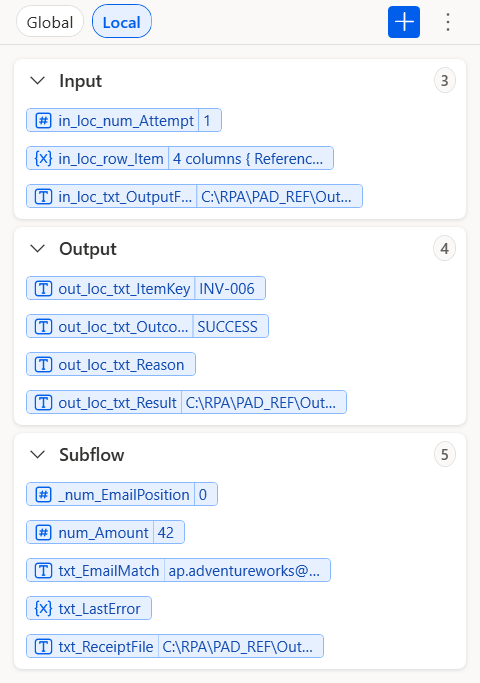
Process_Item, Variables pane, section Local: Input 3, Output 4
Descriptions and examples: the contract. Pictures: Create input and output variables.
1.3 Paste the code
Open the tab of the subflow, click its empty canvas, Ctrl+V.
Main ← flow/1-Main.txt. Check: 193 lines, Errors pane empty.
The code (193 lines)
# ===== Main (global): PAD_REF - transaction framework : Init > Get work items > Process each item (retry, business / system exceptions) > End =====
# Main never stops on an unexpected error : the run is marked FATAL, the report and the outputs are still written.
# TEMPLATE: keep Main as it is ; adapt Process_Item (business steps), Get_Work_Items (source) and the defaults of Load_Config (settings). A new input of Process_Item is also given by its CALL, in region 2.3.1.
@@regionColor: '#57FFE1'
@@CustomNote: 'Everything the end of Main reads is defined here first : even a run that crashes in the first second can still write its report and outputs.'
**REGION 1. Minimal state : outputs, counters and safe defaults the end of the run must find defined
@@CustomNote: 'Pessimistic by default : Success becomes True only in region 5, when the run really reached COMPLETED.'
SET out_glob_bool_Success TO False
@@CustomNote: 'Empty until a FATAL or ABORTED run : the cloud flow shows this text to explain why the run stopped.'
SET out_glob_txt_ErrorMessage TO $''''''
@@CustomNote: 'Filled in region 4 with the JSON summary ; empty here so a crash before that point returns an empty, not a stale, summary.'
SET out_glob_txt_RunSummary TO $''''''
@@CustomNote: 'State machine of the run : RUNNING, then COMPLETED, ABORTED (circuit breaker) or FATAL (unexpected error).'
SET txt_RunStatus TO $'''RUNNING'''
@@CustomNote: 'Reason of a stop, in plain words ; it ends up in ErrorMessage and in the FATAL log line.'
SET txt_FatalReason TO $''''''
@@CustomNote: 'Set by Init_Run ; every log line, report and screenshot carries it so one run can be traced end to end.'
SET txt_RunId TO $''''''
@@CustomNote: 'Empty until Init_Run builds the path : Write_Log then simply reports FAILED instead of crashing.'
SET txt_LogFile TO $''''''
@@CustomNote: 'Empty until Init_Run : Write_Run_Report refuses an empty folder instead of writing to the root of the disk.'
SET txt_ReportsFolder TO $''''''
@@CustomNote: 'Path of the CSV report, quoted in the summary JSON and in the last log line.'
SET txt_ReportCsv TO $''''''
@@CustomNote: 'HTML body of the report, reused as the body of the notification e-mail.'
SET txt_ReportHtmlBody TO $''''''
@@CustomNote: 'Duration of the run in seconds, as text without decimals so the JSON summary stays valid in every Windows locale.'
SET txt_RunSeconds TO $'''0'''
@@CustomNote: 'Reserved for an error inside the end of the run itself (region 4) ; it never stops the clean-up.'
SET txt_FinishError TO $''''''
@@CustomNote: 'No application is closed until Config.csv says which ones : a safe default for the first seconds of the run.'
SET txt_ProcessesToClose TO $''''''
@@CustomNote: 'NONE until the configuration is read : no e-mail can leave by accident before the settings are known.'
SET txt_NotifyChannel TO $'''NONE'''
@@CustomNote: 'Recipients of the run report, read from Config.csv (NotifyTo).'
SET txt_NotifyTo TO $''''''
@@CustomNote: 'Outlook account that sends the report, read from Config.csv (NotifyAccount).'
SET txt_NotifyAccount TO $''''''
@@CustomNote: 'By default only runs that need attention are notified ; a quiet inbox makes real alerts visible.'
SET bool_NotifyOnSuccess TO False
@@CustomNote: 'Number of items returned by Get_Work_Items : the denominator of every count in the report.'
SET num_ItemsRead TO 0
@@CustomNote: 'Items actually processed : lower than ItemsRead when MaxItems or the circuit breaker stopped the loop.'
SET num_ItemsHandled TO 0
@@CustomNote: 'Business view : transactions done.'
SET num_Success TO 0
@@CustomNote: 'Business view : items rejected because of their data ; the business team corrects them.'
SET num_BusinessExceptions TO 0
@@CustomNote: 'Support view : items that failed for a technical reason even after the retries.'
SET num_SystemExceptions TO 0
@@CustomNote: 'Retries after a system exception : a high number reveals an unstable application before it becomes an incident.'
SET num_Retries TO 0
@@CustomNote: 'Circuit breaker counter : reset by every SUCCESS or BUSINESS_EXCEPTION, compared to MaxConsecutiveSystemExceptions.'
SET num_ConsecutiveSystemExceptions TO 0
@@CustomNote: 'Upper case so dev, Dev and DEV select the same rows of Config.csv.'
Text.ChangeCase Text: in_glob_txt_Environment NewCase: Text.CaseOption.UpperCase Result=> txt_Environment
@@CustomNote: 'Start time of the run, used for the duration in the summary and in the last log line.'
DateTime.GetCurrentDateTime.Local DateTimeFormat: DateTime.DateTimeFormat.DateAndTime CurrentDateTime=> date_RunStart
@@CustomNote: 'One row per item, filled by region 2.3.2 : this table becomes the CSV and HTML report of the run.'
Variables.CreateNewDatatable InputTable: { ^['RunId', 'ItemKey', 'Outcome', 'Attempts', 'Reason', 'Result', 'StartedAt', 'DurationMs'] } DataTable=> tbl_Results
**ENDREGION
@@regionColor: '#F4B6B6'
@@CustomNote: 'Everything that can fail sits inside BLOCK Run : an unexpected error jumps to region 3 instead of stopping the robot.'
**REGION 2. Guarded run : an unexpected error marks the run FATAL and goes on to the end of Main
@@CustomNote: 'Guarded zone : its handler only sets the status to FATAL, so the end of Main (report, outputs, clean-up) always runs.'
BLOCK Run
ON BLOCK ERROR
    SET txt_RunStatus TO $'''FATAL'''
END
    @@regionColor: '#C6E0B4'
    @@CustomNote: 'Init : prepare the ground before touching any work item.'
    **REGION 2.1 Init : folders, run id, log file, configuration, applications closed
    @@CustomNote: 'Creates the project folders when missing and gives the run its id and its daily log file.'
    CALL Init_Run in_loc_txt_ProjectFolder: in_glob_txt_ProjectFolder in_loc_txt_ProcessName: in_glob_txt_ProcessName out_loc_txt_RunId=> txt_RunId out_loc_txt_LogFile=> txt_LogFile out_loc_txt_ConfigFile=> txt_ConfigFile out_loc_txt_InputFolder=> txt_InputFolder out_loc_txt_OutputFolder=> txt_OutputFolder out_loc_txt_EvidenceFolder=> txt_EvidenceFolder out_loc_txt_ReportsFolder=> txt_ReportsFolder out_loc_bool_Ok=> bool_InitOk
    @@CustomNote: 'Without its folders the robot cannot log or report : the run stops here, cleanly.'
    IF bool_InitOk = False THEN
        @@CustomNote: 'FATAL : the steps below are skipped, the end of Main still writes what it can.'
        SET txt_RunStatus TO $'''FATAL'''
        @@CustomNote: 'The message tells the support team exactly which folder could not be created.'
        SET txt_FatalReason TO $'''Init_Run failed: the project folders could not be created under %in_glob_txt_ProjectFolder%'''
    END
    @@CustomNote: 'Each stage runs only while the run is still RUNNING : a simple pattern instead of GOTO jumps.'
    IF txt_RunStatus = $'''RUNNING''' THEN
        @@CustomNote: 'First log line of the run : the inputs it received, so a run can be replayed with the same values.'
        CALL Write_Log in_loc_txt_LogFile: txt_LogFile in_loc_txt_RunId: txt_RunId in_loc_txt_MinLevel: in_glob_txt_LogLevel in_loc_txt_Level: $'''INFO''' in_loc_txt_Step: $'''Init''' in_loc_txt_Message: $'''Run started : process %in_glob_txt_ProcessName%, environment %txt_Environment%, project folder %in_glob_txt_ProjectFolder%, max items %in_glob_num_MaxItems%''' out_loc_txt_Status=> _txt_LogStatus
        @@CustomNote: 'Reads Config.csv (created with defaults when missing), applies the rows of the current environment and checks the numbers.'
        CALL Load_Config in_loc_txt_ConfigFile: txt_ConfigFile in_loc_txt_Environment: txt_Environment out_loc_txt_ConfigJson=> txt_ConfigJson out_loc_num_SettingsRead=> num_SettingsRead out_loc_bool_Ok=> bool_ConfigOk out_loc_txt_Detail=> txt_ConfigDetail
        @@CustomNote: 'A wrong configuration stops the run before any item is touched : better no run than a half wrong one.'
        IF bool_ConfigOk = False THEN
            @@CustomNote: 'FATAL : the robot does not guess a missing or wrong setting.'
            SET txt_RunStatus TO $'''FATAL'''
            @@CustomNote: 'The detail names the faulty setting, so the fix is a one line change in Config.csv.'
            SET txt_FatalReason TO $'''Load_Config failed: %txt_ConfigDetail%'''
        END
    END
    @@CustomNote: 'The settings are read once, here, into typed variables : the rest of Main never reads the JSON again.'
    IF txt_RunStatus = $'''RUNNING''' THEN
        # Settings are read once into typed variables : every key exists (defaults of Load_Config) and the numbers were checked there
        @@CustomNote: 'Load_Config returns text (a text crosses the boundary of a local subflow) ; it becomes an object here.'
        Variables.ConvertJsonToCustomObject Json: txt_ConfigJson CustomObject=> obj_Config
        @@CustomNote: 'Every key exists (defaults of Load_Config) and was checked as a number there : this conversion cannot fail.'
        Text.ToNumber Text: obj_Config['MaxRetryNumber'] Number=> num_MaxRetryNumber
        @@CustomNote: 'Circuit breaker threshold : how many system exceptions in a row stop the run.'
        Text.ToNumber Text: obj_Config['MaxConsecutiveSystemExceptions'] Number=> num_MaxConsecutiveSystemExceptions
        @@CustomNote: 'Pause before a retry : gives a slow application time to come back.'
        Text.ToNumber Text: obj_Config['RetryDelaySeconds'] Number=> num_RetryDelaySeconds
        @@CustomNote: 'Screenshots cost disk space and may show data : they can be switched off per environment.'
        SET bool_ScreenshotOnError TO obj_Config['ScreenshotOnSystemException'] = $'''True'''
        @@CustomNote: 'Demo mode : True in the template so it runs out of the box, False in a real process.'
        SET bool_CreateDemoInput TO obj_Config['CreateDemoInput'] = $'''True'''
        @@CustomNote: 'The input file name comes from Config.csv, its folder from the project layout.'
        SET txt_InputFile TO $'''%txt_InputFolder%\\%obj_Config['InputFile']%'''
        @@CustomNote: 'Comma separated process names (EXCEL,msedge) closed at start, before each retry and at the end.'
        SET txt_ProcessesToClose TO obj_Config['ProcessesToClose']
        @@CustomNote: 'NONE, OUTLOOK_DRAFT or OUTLOOK_SEND : DEV usually drafts, PROD sends.'
        SET txt_NotifyChannel TO obj_Config['NotifyChannel']
        @@CustomNote: 'Recipients of the run report.'
        SET txt_NotifyTo TO obj_Config['NotifyTo']
        @@CustomNote: 'Outlook account used to send the report (and passed to Process_Item when the business steps need it).'
        SET txt_NotifyAccount TO obj_Config['NotifyAccount']
        @@CustomNote: 'Also notify fully successful runs : useful at go live, noisy afterwards.'
        SET bool_NotifyOnSuccess TO obj_Config['NotifyOnSuccess'] = $'''True'''
        @@CustomNote: 'DEBUG line : the effective settings, visible only when the log level is DEBUG.'
        CALL Write_Log in_loc_txt_LogFile: txt_LogFile in_loc_txt_RunId: txt_RunId in_loc_txt_MinLevel: in_glob_txt_LogLevel in_loc_txt_Level: $'''DEBUG''' in_loc_txt_Step: $'''Init''' in_loc_txt_Message: $'''Configuration : %num_SettingsRead% row(s) applied from %txt_ConfigFile% ; retries %num_MaxRetryNumber%, consecutive system exceptions limit %num_MaxConsecutiveSystemExceptions%, notification %txt_NotifyChannel%''' out_loc_txt_Status=> _txt_LogStatus
        # A known state before the first item : the applications left open by a previous run are closed
        @@CustomNote: 'Known state before the first item : applications left open by a previous run are closed.'
        CALL Close_Applications in_loc_txt_ProcessNames: txt_ProcessesToClose out_loc_num_Closed=> num_Closed out_loc_bool_Ok=> _bool_CloseOk
    END
    **ENDREGION
    @@regionColor: '#C6E0B4'
    @@CustomNote: 'Get work items : the work list is read once, before any processing.'
    **REGION 2.2 Get work items : the whole list, read once
    @@CustomNote: 'Skipped when Init already failed.'
    IF txt_RunStatus = $'''RUNNING''' THEN
        @@CustomNote: 'One row = one transaction ; replace Get_Work_Items to plug another source (Excel, SQL, API).'
        CALL Get_Work_Items in_loc_txt_InputFile: txt_InputFile in_loc_bool_CreateDemo: bool_CreateDemoInput out_loc_tbl_Items=> tbl_Items out_loc_num_Count=> num_ItemsRead out_loc_bool_Ok=> bool_ItemsOk out_loc_txt_Detail=> txt_ItemsDetail
        @@CustomNote: 'No work list, no run : a missing source is FATAL, not an empty run.'
        IF bool_ItemsOk = False THEN
            @@CustomNote: 'FATAL : nothing was processed, the report says so.'
            SET txt_RunStatus TO $'''FATAL'''
            @@CustomNote: 'The detail says whether the file was missing or unreadable.'
            SET txt_FatalReason TO $'''Get_Work_Items failed: %txt_ItemsDetail%'''
        ELSE
            @@CustomNote: 'INFO line with the number of items : the first figure the business team checks in the log.'
            CALL Write_Log in_loc_txt_LogFile: txt_LogFile in_loc_txt_RunId: txt_RunId in_loc_txt_MinLevel: in_glob_txt_LogLevel in_loc_txt_Level: $'''INFO''' in_loc_txt_Step: $'''Get_Work_Items''' in_loc_txt_Message: $'''%num_ItemsRead% work item(s) read from %txt_InputFile%. %txt_ItemsDetail%''' out_loc_txt_Status=> _txt_LogStatus
        END
    END
    **ENDREGION
    @@regionColor: '#D9C3E9'
    @@CustomNote: 'Process : the heart of the framework, one transaction per row with retries and a circuit breaker.'
    **REGION 2.3 Process : one transaction per item, a system exception is retried after a recovery
    @@CustomNote: 'Skipped when Init or Get work items failed.'
    IF txt_RunStatus = $'''RUNNING''' THEN
        @@CustomNote: 'One pass per work item ; the row travels to Process_Item as a DataRow.'
        LOOP FOREACH row_Item IN tbl_Items
            @@CustomNote: 'MaxItems bounds a smoke run (1 item in production for a first test) ; 0 means no limit.'
            IF in_glob_num_MaxItems > 0 AND num_ItemsHandled >= in_glob_num_MaxItems THEN
                @@CustomNote: 'The log says why the run stopped early : the remaining items are not lost, they wait for the next run.'
                CALL Write_Log in_loc_txt_LogFile: txt_LogFile in_loc_txt_RunId: txt_RunId in_loc_txt_MinLevel: in_glob_txt_LogLevel in_loc_txt_Level: $'''INFO''' in_loc_txt_Step: $'''Process''' in_loc_txt_Message: $'''MaxItems reached (%in_glob_num_MaxItems%) : the remaining items are left for the next run''' out_loc_txt_Status=> _txt_LogStatus
                @@CustomNote: 'Leaves the item loop ; the end of Main still writes the report of what was done.'
                EXIT LOOP
            END
            @@regionColor: '#BDD7EE'
            @@CustomNote: 'Attempts : an item gets up to 1 + MaxRetryNumber attempts, only when the failure is technical.'
            **REGION 2.3.1 Attempts : SUCCESS and BUSINESS_EXCEPTION are final, SYSTEM_EXCEPTION is retried up to MaxRetryNumber times
            @@CustomNote: 'Counts the item as handled before its first attempt, whatever its outcome.'
            SET num_ItemsHandled TO num_ItemsHandled + 1
            @@CustomNote: 'Attempt counter of this item, shown in the report and in the screenshot names.'
            SET num_Attempt TO 0
            @@CustomNote: 'PENDING keeps the attempt loop going ; only a final outcome leaves it.'
            SET txt_Outcome TO $'''PENDING'''
            @@CustomNote: 'Reset for each item : the values of the previous item must never leak into this one.'
            SET txt_ItemKey TO $''''''
            @@CustomNote: 'Reset for each item, like the key.'
            SET txt_Reason TO $''''''
            @@CustomNote: 'Reset for each item, like the key.'
            SET txt_Result TO $''''''
            @@CustomNote: 'Start time of the item, for its duration in the report.'
            DateTime.GetCurrentDateTime.Local DateTimeFormat: DateTime.DateTimeFormat.DateAndTime CurrentDateTime=> date_ItemStart
            @@CustomNote: 'Retry loop : runs again only while the outcome is still PENDING.'
            LOOP WHILE txt_Outcome = $'''PENDING'''
                @@CustomNote: 'One more attempt for this item.'
                SET num_Attempt TO num_Attempt + 1
                @@CustomNote: 'ONE transaction : Process_Item says SUCCESS, BUSINESS_EXCEPTION or SYSTEM_EXCEPTION and never throws.'
                CALL Process_Item in_loc_row_Item: row_Item in_loc_txt_OutputFolder: txt_OutputFolder in_loc_num_Attempt: num_Attempt out_loc_txt_ItemKey=> txt_ItemKey out_loc_txt_Outcome=> txt_AttemptOutcome out_loc_txt_Reason=> txt_Reason out_loc_txt_Result=> txt_Result
                @@CustomNote: 'SUCCESS and BUSINESS_EXCEPTION are final : replaying a wrong data gives the same result.'
                IF txt_AttemptOutcome = $'''SUCCESS''' OR txt_AttemptOutcome = $'''BUSINESS_EXCEPTION''' THEN
                    @@CustomNote: 'The outcome of this attempt becomes the outcome of the item.'
                    SET txt_Outcome TO txt_AttemptOutcome
                    @@CustomNote: 'A working application resets the circuit breaker.'
                    SET num_ConsecutiveSystemExceptions TO 0
                ELSE
                    @@CustomNote: 'One more system exception in a row : the circuit breaker gets closer.'
                    SET num_ConsecutiveSystemExceptions TO num_ConsecutiveSystemExceptions + 1
                    @@CustomNote: 'WARN line for each failed attempt, with the exact message of the failed action.'
                    CALL Write_Log in_loc_txt_LogFile: txt_LogFile in_loc_txt_RunId: txt_RunId in_loc_txt_MinLevel: in_glob_txt_LogLevel in_loc_txt_Level: $'''WARN''' in_loc_txt_Step: $'''Process_Item''' in_loc_txt_Message: $'''System exception on item %txt_ItemKey%, attempt %num_Attempt% : %txt_Reason%''' out_loc_txt_Status=> _txt_LogStatus
                    @@CustomNote: 'The screenshot shows the support team what was on screen at the moment of the failure.'
                    IF bool_ScreenshotOnError = True THEN
                        @@CustomNote: 'PNG named run / item / attempt in the Evidence folder.'
                        CALL Take_Evidence in_loc_txt_EvidenceFolder: txt_EvidenceFolder in_loc_txt_RunId: txt_RunId in_loc_txt_ItemKey: txt_ItemKey in_loc_num_Attempt: num_Attempt out_loc_txt_File=> txt_EvidenceFile out_loc_bool_Ok=> _bool_EvidenceOk
                    END
                    @@CustomNote: 'Circuit breaker : the same failure on and on means the application is down, not the item.'
                    IF num_ConsecutiveSystemExceptions >= num_MaxConsecutiveSystemExceptions THEN
                        @@CustomNote: 'The current item is recorded as a system exception.'
                        SET txt_Outcome TO $'''SYSTEM_EXCEPTION'''
                        @@CustomNote: 'ABORTED stops the item loop ; the end of Main still runs.'
                        SET txt_RunStatus TO $'''ABORTED'''
                        @@CustomNote: 'The reason quotes the last failure : the first clue for the support team.'
                        SET txt_FatalReason TO $'''Run aborted after %num_ConsecutiveSystemExceptions% system exceptions in a row (MaxConsecutiveSystemExceptions = %num_MaxConsecutiveSystemExceptions%). Last one : %txt_Reason%'''
                    ELSE IF num_Attempt > num_MaxRetryNumber THEN
                        @@CustomNote: 'Retries exhausted : the item is a system exception, the run goes on with the next item.'
                        SET txt_Outcome TO $'''SYSTEM_EXCEPTION'''
                    ELSE
                        # Recovery before the retry : the applications are closed so the next attempt starts from a known state
                        @@CustomNote: 'Counted for the report : retries reveal unstable applications.'
                        SET num_Retries TO num_Retries + 1
                        @@CustomNote: 'Recovery : the applications are closed so the next attempt starts from a known state.'
                        CALL Close_Applications in_loc_txt_ProcessNames: txt_ProcessesToClose out_loc_num_Closed=> num_Closed out_loc_bool_Ok=> _bool_CloseOk
                        @@CustomNote: 'Deliberate pause before the retry (RetryDelaySeconds), not a synchronisation wait.'
                        WAIT num_RetryDelaySeconds
                    END
                END
            END
            **ENDREGION
            @@regionColor: '#BDD7EE'
            @@CustomNote: 'Transaction status : every item leaves the same traces, whatever its outcome.'
            **REGION 2.3.2 Transaction status : counters, one result row and one log line per item
            @@CustomNote: 'End time of the item.'
            DateTime.GetCurrentDateTime.Local DateTimeFormat: DateTime.DateTimeFormat.DateAndTime CurrentDateTime=> date_ItemEnd
            @@CustomNote: 'Duration of the item, attempts and pauses included.'
            DateTime.Subtract FromDate: date_ItemEnd SubstractDate: date_ItemStart TimeUnit: DateTime.DifferenceTimeUnit.Seconds TimeDifference=> num_ItemSeconds
            @@CustomNote: 'Milliseconds without decimals : the same text in every Windows locale.'
            Text.FromNumber Number: num_ItemSeconds * 1000 DecimalPlaces: 0 UseThousandsSeparator: False FormattedNumber=> txt_ItemMs
            @@CustomNote: 'Start time written as text in a fixed format, for Excel or Power BI.'
            Text.ConvertDateTimeToText.FromCustomDateTime DateTime: date_ItemStart CustomFormat: $'''yyyy-MM-dd HH:mm:ss''' Result=> txt_ItemStart
            @@CustomNote: 'One row of the report per item : key, outcome, attempts, reason, result, start, duration.'
            Variables.AddRowToDataTable.AppendRowToDataTable DataTable: tbl_Results RowToAdd: [txt_RunId, txt_ItemKey, txt_Outcome, num_Attempt, txt_Reason, txt_Result, txt_ItemStart, txt_ItemMs]
            @@CustomNote: 'One log line per item, its level following the outcome.'
            IF txt_Outcome = $'''SUCCESS''' THEN
                @@CustomNote: 'Business count of transactions done.'
                SET num_Success TO num_Success + 1
                @@CustomNote: 'INFO : the result of the transaction (a file, a draft, an id) is quoted.'
                CALL Write_Log in_loc_txt_LogFile: txt_LogFile in_loc_txt_RunId: txt_RunId in_loc_txt_MinLevel: in_glob_txt_LogLevel in_loc_txt_Level: $'''INFO''' in_loc_txt_Step: $'''Process''' in_loc_txt_Message: $'''Item %txt_ItemKey% : SUCCESS in %num_Attempt% attempt(s), %txt_ItemMs% ms ; %txt_Result%''' out_loc_txt_Status=> _txt_LogStatus
            ELSE IF txt_Outcome = $'''BUSINESS_EXCEPTION''' THEN
                @@CustomNote: 'Business count of data errors.'
                SET num_BusinessExceptions TO num_BusinessExceptions + 1
                @@CustomNote: 'WARN : the business team reads the reason and corrects the data.'
                CALL Write_Log in_loc_txt_LogFile: txt_LogFile in_loc_txt_RunId: txt_RunId in_loc_txt_MinLevel: in_glob_txt_LogLevel in_loc_txt_Level: $'''WARN''' in_loc_txt_Step: $'''Process''' in_loc_txt_Message: $'''Item %txt_ItemKey% : BUSINESS_EXCEPTION ; %txt_Reason%''' out_loc_txt_Status=> _txt_LogStatus
            ELSE
                @@CustomNote: 'Support count of technical failures.'
                SET num_SystemExceptions TO num_SystemExceptions + 1
                @@CustomNote: 'ERROR : the support team reads the reason and the screenshots.'
                CALL Write_Log in_loc_txt_LogFile: txt_LogFile in_loc_txt_RunId: txt_RunId in_loc_txt_MinLevel: in_glob_txt_LogLevel in_loc_txt_Level: $'''ERROR''' in_loc_txt_Step: $'''Process''' in_loc_txt_Message: $'''Item %txt_ItemKey% : SYSTEM_EXCEPTION after %num_Attempt% attempt(s) ; %txt_Reason%''' out_loc_txt_Status=> _txt_LogStatus
            END
            **ENDREGION
            @@CustomNote: 'A circuit breaker inside the attempts also stops the item loop.'
            IF txt_RunStatus <> $'''RUNNING''' THEN
                @@CustomNote: 'Leaves the item loop after an ABORTED.'
                EXIT LOOP
            END
        END
    END
    **ENDREGION
END
**ENDREGION
@@regionColor: '#F4B6B6'
@@CustomNote: 'Run status : decide COMPLETED, ABORTED or FATAL and explain it.'
**REGION 3. Run status : COMPLETED, ABORTED or FATAL with the message of the unexpected error on one line
@@CustomNote: 'FATAL without a reason means an unexpected error caught by BLOCK Run : its message is read here.'
IF txt_RunStatus = $'''FATAL''' AND txt_FatalReason = $'''''' THEN
    @@CustomNote: 'Get last error : the message of the action that failed (subflow, action, error, details).'
    ERROR => txt_LastError
    @@CustomNote: 'The message is put on one line : a log line and a JSON value must not break.'
    Text.Replace.ReplaceTextWithRegex Text: txt_LastError TextToFind: $'''\\s*[\\r\\n]+\\s*''' IgnoreCase: False ReplaceWith: $''' / ''' ActivateEscapeSequences: False Result=> txt_FatalReason
END
@@CustomNote: 'Nobody stopped the run : it is COMPLETED, even with items in exception.'
IF txt_RunStatus = $'''RUNNING''' THEN
    @@CustomNote: 'COMPLETED means the robot did its job ; item exceptions are results, not robot failures.'
    SET txt_RunStatus TO $'''COMPLETED'''
END
@@CustomNote: 'A stopped run leaves one FATAL line in the log.'
IF txt_FatalReason <> $'''''' THEN
    @@CustomNote: 'FATAL line : status and reason, also sent to the Power Automate run log.'
    CALL Write_Log in_loc_txt_LogFile: txt_LogFile in_loc_txt_RunId: txt_RunId in_loc_txt_MinLevel: in_glob_txt_LogLevel in_loc_txt_Level: $'''FATAL''' in_loc_txt_Step: $'''Main''' in_loc_txt_Message: $'''%txt_RunStatus% : %txt_FatalReason%''' out_loc_txt_Status=> _txt_LogStatus
END
**ENDREGION
@@regionColor: '#FFD966'
@@CustomNote: 'End : report, summary and notification, each one isolated so none can stop the clean-up.'
**REGION 4. End : run report, JSON summary, notification - each step reports its own failure, none stops the end
@@CustomNote: 'Second guarded zone : a failure in the report or the e-mail never prevents the outputs from being set.'
BLOCK Finish
ON BLOCK ERROR
    SET txt_FinishError TO $'''The end of the run failed : see the error list of the run'''
END
    @@CustomNote: 'End time of the run.'
    DateTime.GetCurrentDateTime.Local DateTimeFormat: DateTime.DateTimeFormat.DateAndTime CurrentDateTime=> date_RunEnd
    @@CustomNote: 'Duration of the whole run.'
    DateTime.Subtract FromDate: date_RunEnd SubstractDate: date_RunStart TimeUnit: DateTime.DifferenceTimeUnit.Seconds TimeDifference=> num_RunSeconds
    @@CustomNote: 'Seconds without decimals : valid JSON in every Windows locale.'
    Text.FromNumber Number: num_RunSeconds DecimalPlaces: 0 UseThousandsSeparator: False FormattedNumber=> txt_RunSeconds
    @@CustomNote: 'CSV for Excel or Power BI and HTML for people : one row per item.'
    CALL Write_Run_Report in_loc_tbl_Results: tbl_Results in_loc_txt_ReportsFolder: txt_ReportsFolder in_loc_txt_RunId: txt_RunId in_loc_txt_Title: $'''%in_glob_txt_ProcessName% - %txt_Environment% - %txt_RunStatus%''' out_loc_txt_CsvFile=> txt_ReportCsv out_loc_txt_HtmlFile=> txt_ReportHtml out_loc_txt_Html=> txt_ReportHtmlBody out_loc_bool_Ok=> bool_ReportOk
    @@CustomNote: 'A report that could not be written is not quoted in the summary.'
    IF bool_ReportOk = False THEN
        @@CustomNote: 'The summary points to no file rather than to a missing one.'
        SET txt_ReportCsv TO $''''''
    END
    @@CustomNote: 'Paths contain backslashes : escaped so the JSON stays valid.'
    CALL To_Json_Text in_loc_txt_Text: txt_ReportCsv out_loc_txt_Json=> txt_ReportCsvJson
    @@CustomNote: 'The fatal reason may contain quotes or backslashes : escaped too.'
    CALL To_Json_Text in_loc_txt_Text: txt_FatalReason out_loc_txt_Json=> txt_FatalReasonJson
    @@CustomNote: 'The process name is free text typed by a maker : escaped as well.'
    CALL To_Json_Text in_loc_txt_Text: in_glob_txt_ProcessName out_loc_txt_Json=> txt_ProcessNameJson
    @@CustomNote: 'JSON summary of the run : what a cloud flow reads to decide what to do next.'
    SET out_glob_txt_RunSummary TO $'''{\"runId\": \"%txt_RunId%\", \"process\": \"%txt_ProcessNameJson%\", \"environment\": \"%txt_Environment%\", \"status\": \"%txt_RunStatus%\", \"itemsRead\": %num_ItemsRead%, \"itemsHandled\": %num_ItemsHandled%, \"success\": %num_Success%, \"businessExceptions\": %num_BusinessExceptions%, \"systemExceptions\": %num_SystemExceptions%, \"retries\": %num_Retries%, \"durationSeconds\": %txt_RunSeconds%, \"report\": \"%txt_ReportCsvJson%\", \"error\": \"%txt_FatalReasonJson%\"}'''
    # Self-check : the summary is read back as JSON, the way a cloud flow will parse it
    @@CustomNote: 'The summary is checked before it leaves the robot.'
    SET bool_SummaryOk TO True
    @@CustomNote: 'Self check : the summary is parsed back as JSON, the way the cloud flow will parse it.'
    Variables.ConvertJsonToCustomObject Json: out_glob_txt_RunSummary CustomObject=> _obj_SummaryCheck
    ON ERROR
        SET bool_SummaryOk TO False
    END
    @@CustomNote: 'An invalid summary is logged rather than hidden.'
    IF bool_SummaryOk = False THEN
        @@CustomNote: 'WARN line with the faulty summary, to fix the template.'
        CALL Write_Log in_loc_txt_LogFile: txt_LogFile in_loc_txt_RunId: txt_RunId in_loc_txt_MinLevel: in_glob_txt_LogLevel in_loc_txt_Level: $'''WARN''' in_loc_txt_Step: $'''End''' in_loc_txt_Message: $'''The run summary is not valid JSON : %out_glob_txt_RunSummary%''' out_loc_txt_Status=> _txt_LogStatus
    END
    @@CustomNote: 'Notify only when someone has something to do, unless NotifyOnSuccess asks for every run.'
    SET bool_Notify TO bool_NotifyOnSuccess = True OR txt_RunStatus <> $'''COMPLETED''' OR num_BusinessExceptions > 0 OR num_SystemExceptions > 0
    @@CustomNote: 'No notification for a quiet, fully successful run.'
    IF bool_Notify = True THEN
        @@CustomNote: 'Outlook draft or e-mail with the HTML report ; NONE in the demo.'
        CALL Send_Notification in_loc_txt_Channel: txt_NotifyChannel in_loc_txt_To: txt_NotifyTo in_loc_txt_Account: txt_NotifyAccount in_loc_txt_Subject: $'''[%txt_RunStatus%] %in_glob_txt_ProcessName% %txt_Environment% : %num_Success% success, %num_BusinessExceptions% business, %num_SystemExceptions% system''' in_loc_txt_HtmlBody: txt_ReportHtmlBody out_loc_bool_Sent=> bool_NotificationSent out_loc_txt_Detail=> txt_NotificationDetail
        @@CustomNote: 'DEBUG line : whether the notification left and why.'
        CALL Write_Log in_loc_txt_LogFile: txt_LogFile in_loc_txt_RunId: txt_RunId in_loc_txt_MinLevel: in_glob_txt_LogLevel in_loc_txt_Level: $'''DEBUG''' in_loc_txt_Step: $'''End''' in_loc_txt_Message: $'''Notification sent %bool_NotificationSent% : %txt_NotificationDetail%''' out_loc_txt_Status=> _txt_LogStatus
    END
END
**ENDREGION
@@regionColor: '#F4B6B6'
@@CustomNote: 'Clean-up and outputs : always run, after a success as after a crash.'
**REGION 5. Clean-up and outputs : applications closed, flow outputs set, one summary line in the log
@@CustomNote: 'Applications are closed so the next run starts clean.'
CALL Close_Applications in_loc_txt_ProcessNames: txt_ProcessesToClose out_loc_num_Closed=> num_Closed out_loc_bool_Ok=> _bool_CloseOk
@@CustomNote: 'Success is True only for COMPLETED ; the cloud flow branches on it.'
SET out_glob_bool_Success TO txt_RunStatus = $'''COMPLETED'''
@@CustomNote: 'Empty for a COMPLETED run, the reason otherwise.'
SET out_glob_txt_ErrorMessage TO txt_FatalReason
@@CustomNote: 'Level of the last log line, INFO for a successful run.'
SET txt_EndLevel TO $'''INFO'''
@@CustomNote: 'A run that did not complete ends with an ERROR line, easy to filter.'
IF out_glob_bool_Success = False THEN
    @@CustomNote: 'ERROR : the last line of a failed run stands out in the log.'
    SET txt_EndLevel TO $'''ERROR'''
END
@@CustomNote: 'Last line of the run : status, counts, retries, duration and report paths in one line.'
CALL Write_Log in_loc_txt_LogFile: txt_LogFile in_loc_txt_RunId: txt_RunId in_loc_txt_MinLevel: in_glob_txt_LogLevel in_loc_txt_Level: txt_EndLevel in_loc_txt_Step: $'''Main''' in_loc_txt_Message: $'''Run ended %txt_RunStatus% in %txt_RunSeconds% s : %num_ItemsHandled% / %num_ItemsRead% item(s), %num_Success% success, %num_BusinessExceptions% business, %num_SystemExceptions% system, %num_Retries% retries ; report %txt_ReportCsv% and %txt_ReportHtml%''' out_loc_txt_Status=> _txt_LogStatus
**ENDREGION
Tests (optional) ← flow/2-Tests.txt. Check: 190 lines, Errors pane empty.
The code (190 lines)
# ===== Tests (global): one case per local function and per recovery path, PASS / FAIL lines written as they run =====
# Run: right-click the first action > Run from here with default values. Each case states the values it expects.
@@regionColor: '#57FFE1'
@@CustomNote: 'Fixtures : every case works in its own folder under C:\\Temp, nothing of a real project is touched.'
**REGION 1. Fixtures : a fresh test root, the report file, fixed work items
@@CustomNote: 'The report accumulates the PASS / FAIL lines ; Verify also writes each line to the file at once.'
SET txt_Report TO $''''''
@@CustomNote: 'The stamp separates two test runs : their folders and reports never mix.'
DateTime.GetCurrentDateTime.Local DateTimeFormat: DateTime.DateTimeFormat.DateAndTime CurrentDateTime=> date_Now
@@CustomNote: 'yyyyMMdd-HHmmss : sorts in time order in the Temp folder.'
Text.ConvertDateTimeToText.FromCustomDateTime DateTime: date_Now CustomFormat: $'''yyyyMMdd-HHmmss''' Result=> txt_Stamp
@@CustomNote: 'A fresh root per test run : the folder creation cases always start from nothing.'
SET txt_TestRoot TO $'''C:\\Temp\\PAD_REF_Tests\\%txt_Stamp%'''
@@CustomNote: 'One report file per test run, kept as the proof of the run.'
SET txt_TestReportFile TO $'''C:\\Temp\\tests-PAD_REF-%txt_Stamp%.txt'''
@@CustomNote: 'A path whose drive folder does not exist : every recovery case uses it to force a failure.'
SET txt_UnreachableFile TO $'''C:\\PAD_REF_does_not_exist\\missing\\file.txt'''
@@CustomNote: 'Fixed work items covering the three outcomes : one success, three business rules broken, one file name Windows refuses.'
Variables.CreateNewDatatable InputTable: { ^['Reference', 'Customer', 'Amount', 'Email'], ['T-001', 'Contoso', '1250', 'ap@contoso.com'], ['T-002', 'Fabrikam', '-10', 'billing@fabrikam.com'], ['T-003', 'Northwind', 'abc', 'finance.northwind@example.com'], ['T-004', 'Tailspin', '300', 'no-email'], ['T:005', 'Litware', '99', 'ap.litware@example.com'] } DataTable=> tbl_Fixture
**ENDREGION
@@regionColor: '#D9C3E9'
@@CustomNote: 'Init_Run : the folders are created even when the parents do not exist, and an empty path is refused.'
**REGION 2. Init_Run : nested folders created, empty project folder refused
# --- Init_Run : a project folder two levels below a missing folder -> every level and the 6 sub-folders created, run id and log file set ---
@@CustomNote: 'The parent of project does not exist yet : proves that every missing level is created (Folder.Create alone refuses).'
CALL Init_Run in_loc_txt_ProjectFolder: $'''%txt_TestRoot%\\project''' in_loc_txt_ProcessName: $'''PAD_REF_Test''' out_loc_txt_RunId=> txt_RunId out_loc_txt_LogFile=> txt_LogFile out_loc_txt_ConfigFile=> txt_ConfigFile out_loc_txt_InputFolder=> txt_InputFolder out_loc_txt_OutputFolder=> txt_OutputFolder out_loc_txt_EvidenceFolder=> txt_EvidenceFolder out_loc_txt_ReportsFolder=> txt_ReportsFolder out_loc_bool_Ok=> bool_Ok
@@CustomNote: 'Checked on disk, not only from the Ok flag the function returns.'
SET bool_FolderOk TO False
@@CustomNote: 'The Reports folder is the last one created : if it exists, the six exist.'
IF (Folder.IfFolderExists.Exists Path: txt_ReportsFolder) THEN
@@CustomNote: 'Folder found on disk.'
SET bool_FolderOk TO True
END
@@CustomNote: 'PASS needs the flag, the folder on disk, a run id and a log file name.'
SET bool_Pass TO bool_Ok = True AND bool_FolderOk = True AND txt_RunId <> $'''''' AND txt_LogFile <> $''''''
@@CustomNote: 'Writes PASS or FAIL with the observed values, so a FAIL explains itself.'
CALL Verify in_loc_txt_Case: $'''Init_Run - nested project folder created, run id and log file set''' in_loc_bool_Ok: bool_Pass in_loc_txt_Detail: $'''Ok=%bool_Ok% ReportsFolderExists=%bool_FolderOk% RunId=%txt_RunId% LogFile=%txt_LogFile%''' in_loc_txt_ReportIn: txt_Report in_loc_txt_ReportFile: txt_TestReportFile out_loc_txt_Report=> txt_Report
# --- Init_Run - recovery : an empty project folder gives Ok = False without exception ---
@@CustomNote: 'Recovery case : an empty project folder must give Ok = False, never a crash.'
CALL Init_Run in_loc_txt_ProjectFolder: $'''''' in_loc_txt_ProcessName: $'''PAD_REF_Test''' out_loc_txt_RunId=> _txt_RunId out_loc_txt_LogFile=> _txt_LogFile out_loc_txt_ConfigFile=> _txt_ConfigFile out_loc_txt_InputFolder=> _txt_InputFolder out_loc_txt_OutputFolder=> _txt_OutputFolder out_loc_txt_EvidenceFolder=> _txt_EvidenceFolder out_loc_txt_ReportsFolder=> _txt_ReportsFolder out_loc_bool_Ok=> bool_Ok
@@CustomNote: 'The expected answer is a refusal.'
SET bool_Pass TO bool_Ok = False
@@CustomNote: 'A FAIL here would mean a robot that writes to an undefined folder.'
CALL Verify in_loc_txt_Case: $'''Init_Run - recovery : empty project folder -> Ok = False''' in_loc_bool_Ok: bool_Pass in_loc_txt_Detail: $'''Ok=%bool_Ok%''' in_loc_txt_ReportIn: txt_Report in_loc_txt_ReportFile: txt_TestReportFile out_loc_txt_Report=> txt_Report
**ENDREGION
@@regionColor: '#D9C3E9'
@@CustomNote: 'Write_Log : a line is written, a line under the minimum level is filtered, an unreachable file fails softly.'
**REGION 3. Write_Log : written, filtered, failed
# --- Write_Log : an INFO line with the minimum level INFO is written, fields separated by ' | ' ---
@@CustomNote: 'The level is given in lower case on purpose : Write_Log must accept info as INFO.'
CALL Write_Log in_loc_txt_LogFile: txt_LogFile in_loc_txt_RunId: txt_RunId in_loc_txt_MinLevel: $'''INFO''' in_loc_txt_Level: $'''info''' in_loc_txt_Step: $'''Tests''' in_loc_txt_Message: $'''Test line for Write_Log''' out_loc_txt_Status=> txt_LogStatus
@@CustomNote: 'Reset first : a failed read must not leave the content of an earlier case.'
SET txt_LogContent TO $''''''
@@CustomNote: 'The file is read back : the case checks what is really on disk.'
File.ReadTextFromFile.ReadText File: txt_LogFile Encoding: File.TextFileEncoding.UTF8 Content=> txt_LogContent
ON ERROR
SET txt_LogContent TO $'''(log file not readable)'''
END
@@CustomNote: 'The exact layout is checked : time | run | level | step | message.'
Text.ParseText.ParseForFirstOccurrence Text: txt_LogContent TextToFind: $''' | INFO | Tests | Test line for Write_Log''' StartingPosition: 0 IgnoreCase: False OccurrencePosition=> num_Position
@@CustomNote: 'PASS when the status says WRITTEN and the line is in the file.'
SET bool_Pass TO txt_LogStatus = $'''WRITTEN''' AND num_Position >= 0
@@CustomNote: 'Records the result of the case.'
CALL Verify in_loc_txt_Case: $'''Write_Log - INFO line written at minimum level INFO''' in_loc_bool_Ok: bool_Pass in_loc_txt_Detail: $'''Status=%txt_LogStatus% Position=%num_Position%''' in_loc_txt_ReportIn: txt_Report in_loc_txt_ReportFile: txt_TestReportFile out_loc_txt_Report=> txt_Report
# --- Write_Log : a DEBUG line with the minimum level INFO is filtered ---
@@CustomNote: 'DEBUG is below INFO : this line must not reach the file.'
CALL Write_Log in_loc_txt_LogFile: txt_LogFile in_loc_txt_RunId: txt_RunId in_loc_txt_MinLevel: $'''INFO''' in_loc_txt_Level: $'''DEBUG''' in_loc_txt_Step: $'''Tests''' in_loc_txt_Message: $'''Debug line that must not be written''' out_loc_txt_Status=> txt_LogStatus
@@CustomNote: 'The function must say FILTERED, not WRITTEN and not FAILED.'
SET bool_Pass TO txt_LogStatus = $'''FILTERED'''
@@CustomNote: 'Records the result of the case.'
CALL Verify in_loc_txt_Case: $'''Write_Log - DEBUG line filtered at minimum level INFO''' in_loc_bool_Ok: bool_Pass in_loc_txt_Detail: $'''Status=%txt_LogStatus%''' in_loc_txt_ReportIn: txt_Report in_loc_txt_ReportFile: txt_TestReportFile out_loc_txt_Report=> txt_Report
# --- Write_Log - recovery : a log file in a missing folder gives FAILED without exception ---
@@CustomNote: 'Recovery case : a log file in a missing folder must not stop a robot.'
CALL Write_Log in_loc_txt_LogFile: txt_UnreachableFile in_loc_txt_RunId: txt_RunId in_loc_txt_MinLevel: $'''INFO''' in_loc_txt_Level: $'''ERROR''' in_loc_txt_Step: $'''Tests''' in_loc_txt_Message: $'''Line to an unreachable file''' out_loc_txt_Status=> txt_LogStatus
@@CustomNote: 'FAILED without exception : the robot goes on, only the log line is lost.'
SET bool_Pass TO txt_LogStatus = $'''FAILED'''
@@CustomNote: 'Records the result of the case.'
CALL Verify in_loc_txt_Case: $'''Write_Log - recovery : unreachable log file -> FAILED''' in_loc_bool_Ok: bool_Pass in_loc_txt_Detail: $'''Status=%txt_LogStatus%''' in_loc_txt_ReportIn: txt_Report in_loc_txt_ReportFile: txt_TestReportFile out_loc_txt_Report=> txt_Report
**ENDREGION
@@regionColor: '#D9C3E9'
@@CustomNote: 'Load_Config : defaults, environment override and the three ways a configuration can be wrong.'
**REGION 4. Load_Config : defaults written, environment override, invalid number, wrong header, unreachable file
# --- Load_Config : no Config.csv -> the default one is written ; DEV applies the 11 rows '*' -> MaxRetryNumber 2 ---
@@CustomNote: 'No Config.csv yet : Load_Config must write the default one and use it ; dev in lower case checks the upper casing.'
CALL Load_Config in_loc_txt_ConfigFile: txt_ConfigFile in_loc_txt_Environment: $'''dev''' out_loc_txt_ConfigJson=> txt_ConfigJson out_loc_num_SettingsRead=> num_SettingsRead out_loc_bool_Ok=> bool_Ok out_loc_txt_Detail=> txt_Detail
@@CustomNote: 'The JSON returned by the function is parsed, as Main does.'
Variables.ConvertJsonToCustomObject Json: txt_ConfigJson CustomObject=> obj_Config
@@CustomNote: 'Checked on disk : the default file must exist after the call.'
SET bool_FileOk TO False
@@CustomNote: 'The default Config.csv was written.'
IF (File.IfFile.Exists File: txt_ConfigFile) THEN
@@CustomNote: 'File found on disk.'
SET bool_FileOk TO True
END
@@CustomNote: '11 rows apply to every environment ; the PROD row must not apply in DEV.'
SET bool_Pass TO bool_Ok = True AND bool_FileOk = True AND num_SettingsRead = 11 AND obj_Config['MaxRetryNumber'] = $'''2''' AND obj_Config['NotifyChannel'] = $'''NONE'''
@@CustomNote: 'Records the result of the case.'
CALL Verify in_loc_txt_Case: $'''Load_Config - default Config.csv written, DEV -> 11 rows, MaxRetryNumber 2''' in_loc_bool_Ok: bool_Pass in_loc_txt_Detail: $'''Ok=%bool_Ok% FileExists=%bool_FileOk% Rows=%num_SettingsRead% Detail=%txt_Detail% Json=%txt_ConfigJson%''' in_loc_txt_ReportIn: txt_Report in_loc_txt_ReportFile: txt_TestReportFile out_loc_txt_Report=> txt_Report
# --- Load_Config : PROD applies the 11 rows '*' then its own row -> 12 rows, MaxRetryNumber 1 ---
@@CustomNote: 'Same file, environment PROD : its own row must win over the row for every environment.'
CALL Load_Config in_loc_txt_ConfigFile: txt_ConfigFile in_loc_txt_Environment: $'''PROD''' out_loc_txt_ConfigJson=> txt_ConfigJson out_loc_num_SettingsRead=> num_SettingsRead out_loc_bool_Ok=> bool_Ok out_loc_txt_Detail=> txt_Detail
@@CustomNote: 'Parsed again for the PROD values.'
Variables.ConvertJsonToCustomObject Json: txt_ConfigJson CustomObject=> obj_Config
@@CustomNote: '12 rows applied and MaxRetryNumber 1 : the PROD override is proven.'
SET bool_Pass TO bool_Ok = True AND num_SettingsRead = 12 AND obj_Config['MaxRetryNumber'] = $'''1'''
@@CustomNote: 'Records the result of the case.'
CALL Verify in_loc_txt_Case: $'''Load_Config - PROD override -> 12 rows, MaxRetryNumber 1''' in_loc_bool_Ok: bool_Pass in_loc_txt_Detail: $'''Ok=%bool_Ok% Rows=%num_SettingsRead% Json=%txt_ConfigJson%''' in_loc_txt_ReportIn: txt_Report in_loc_txt_ReportFile: txt_TestReportFile out_loc_txt_Report=> txt_Report
# --- Load_Config - recovery : a setting that must be a number is not -> Ok = False, the detail names it ---
@@CustomNote: 'A configuration where a number is not a number.'
SET txt_BadConfig TO $'''%txt_TestRoot%\\bad-number.csv'''
@@CustomNote: 'Written by the test itself : the case does not depend on a file shipped with the flow.'
File.WriteText File: txt_BadConfig TextToWrite: $'''Name;Value;Environment;Description
MaxRetryNumber;abc;*;not a number''' AppendNewLine: True IfFileExists: File.IfFileExists.Overwrite Encoding: File.FileEncoding.UTF8
@@CustomNote: 'The function must refuse the file and name the faulty key.'
CALL Load_Config in_loc_txt_ConfigFile: txt_BadConfig in_loc_txt_Environment: $'''DEV''' out_loc_txt_ConfigJson=> _txt_ConfigJson out_loc_num_SettingsRead=> num_SettingsRead out_loc_bool_Ok=> bool_Ok out_loc_txt_Detail=> txt_Detail
@@CustomNote: 'The detail must name MaxRetryNumber : that is what makes the error actionable.'
Text.ParseText.ParseForFirstOccurrence Text: txt_Detail TextToFind: $'''MaxRetryNumber''' StartingPosition: 0 IgnoreCase: False OccurrencePosition=> num_Position
@@CustomNote: 'Refused AND explained.'
SET bool_Pass TO bool_Ok = False AND num_Position >= 0
@@CustomNote: 'Records the result of the case.'
CALL Verify in_loc_txt_Case: $'''Load_Config - recovery : MaxRetryNumber abc -> Ok = False, detail names the key''' in_loc_bool_Ok: bool_Pass in_loc_txt_Detail: $'''Ok=%bool_Ok% Detail=%txt_Detail%''' in_loc_txt_ReportIn: txt_Report in_loc_txt_ReportFile: txt_TestReportFile out_loc_txt_Report=> txt_Report
# --- Load_Config - recovery : a file without the header Name;Value;Environment -> Ok = False, no column read ---
@@CustomNote: 'A configuration without the expected header.'
SET txt_BadConfig TO $'''%txt_TestRoot%\\bad-header.csv'''
@@CustomNote: 'A header that is not Name;Value;Environment.'
File.WriteText File: txt_BadConfig TextToWrite: $'''Key;Val
MaxRetryNumber;3''' AppendNewLine: True IfFileExists: File.IfFileExists.Overwrite Encoding: File.FileEncoding.UTF8
@@CustomNote: 'Refused before any column is read : a missing column would stop the flow without any handler.'
CALL Load_Config in_loc_txt_ConfigFile: txt_BadConfig in_loc_txt_Environment: $'''DEV''' out_loc_txt_ConfigJson=> _txt_ConfigJson out_loc_num_SettingsRead=> num_SettingsRead out_loc_bool_Ok=> bool_Ok out_loc_txt_Detail=> txt_Detail
@@CustomNote: 'Refused and no setting applied.'
SET bool_Pass TO bool_Ok = False AND num_SettingsRead = 0
@@CustomNote: 'Records the result of the case.'
CALL Verify in_loc_txt_Case: $'''Load_Config - recovery : wrong header -> Ok = False''' in_loc_bool_Ok: bool_Pass in_loc_txt_Detail: $'''Ok=%bool_Ok% Rows=%num_SettingsRead% Detail=%txt_Detail%''' in_loc_txt_ReportIn: txt_Report in_loc_txt_ReportFile: txt_TestReportFile out_loc_txt_Report=> txt_Report
# --- Load_Config - recovery : a Config.csv in a missing folder cannot be written -> Ok = False ---
@@CustomNote: 'Recovery case : the default file cannot even be written in a missing folder.'
CALL Load_Config in_loc_txt_ConfigFile: txt_UnreachableFile in_loc_txt_Environment: $'''DEV''' out_loc_txt_ConfigJson=> _txt_ConfigJson out_loc_num_SettingsRead=> num_SettingsRead out_loc_bool_Ok=> bool_Ok out_loc_txt_Detail=> txt_Detail
@@CustomNote: 'The expected answer is a refusal.'
SET bool_Pass TO bool_Ok = False
@@CustomNote: 'Records the result of the case.'
CALL Verify in_loc_txt_Case: $'''Load_Config - recovery : unreachable config file -> Ok = False''' in_loc_bool_Ok: bool_Pass in_loc_txt_Detail: $'''Ok=%bool_Ok% Detail=%txt_Detail%''' in_loc_txt_ReportIn: txt_Report in_loc_txt_ReportFile: txt_TestReportFile out_loc_txt_Report=> txt_Report
**ENDREGION
@@regionColor: '#D9C3E9'
@@CustomNote: 'Get_Work_Items : the demo file is created and read, a missing file without demo is refused.'
**REGION 5. Get_Work_Items : demo file created and read, missing file refused
# --- Get_Work_Items : no input file, demo requested -> 6 items, the fifth is INV:005 ---
@@CustomNote: 'Demo mode : the function writes the 6 demo items, then reads them like a real file.'
CALL Get_Work_Items in_loc_txt_InputFile: $'''%txt_InputFolder%\\work-items.csv''' in_loc_bool_CreateDemo: True out_loc_tbl_Items=> tbl_Items out_loc_num_Count=> num_Count out_loc_bool_Ok=> bool_Ok out_loc_txt_Detail=> txt_Detail
@@CustomNote: 'Reset first : a missing row must not leave a value of an earlier case.'
SET txt_FifthKey TO $''''''
@@CustomNote: 'Guard : indexing a table that is too short would stop the flow, no handler catches it.'
IF num_Count >= 5 THEN
@@CustomNote: 'The fifth row is the one with the refused file name : it proves the order and the content.'
SET txt_FifthKey TO $'''%tbl_Items[4]['Reference']%'''
END
@@CustomNote: '6 rows and the right fifth key.'
SET bool_Pass TO bool_Ok = True AND num_Count = 6 AND txt_FifthKey = $'''INV:005'''
@@CustomNote: 'Records the result of the case.'
CALL Verify in_loc_txt_Case: $'''Get_Work_Items - demo file created and read -> 6 items, fifth INV:005''' in_loc_bool_Ok: bool_Pass in_loc_txt_Detail: $'''Ok=%bool_Ok% Count=%num_Count% Fifth=%txt_FifthKey% Detail=%txt_Detail%''' in_loc_txt_ReportIn: txt_Report in_loc_txt_ReportFile: txt_TestReportFile out_loc_txt_Report=> txt_Report
# --- Get_Work_Items - recovery : no input file, no demo -> Ok = False, 0 item ---
@@CustomNote: 'Recovery case : no file and no demo must be an error the caller can test.'
CALL Get_Work_Items in_loc_txt_InputFile: $'''%txt_InputFolder%\\absent.csv''' in_loc_bool_CreateDemo: False out_loc_tbl_Items=> _tbl_Items out_loc_num_Count=> num_Count out_loc_bool_Ok=> bool_Ok out_loc_txt_Detail=> txt_Detail
@@CustomNote: 'Ok = False and no item.'
SET bool_Pass TO bool_Ok = False AND num_Count = 0
@@CustomNote: 'Records the result of the case.'
CALL Verify in_loc_txt_Case: $'''Get_Work_Items - recovery : missing file without demo -> Ok = False''' in_loc_bool_Ok: bool_Pass in_loc_txt_Detail: $'''Ok=%bool_Ok% Count=%num_Count% Detail=%txt_Detail%''' in_loc_txt_ReportIn: txt_Report in_loc_txt_ReportFile: txt_TestReportFile out_loc_txt_Report=> txt_Report
**ENDREGION
@@regionColor: '#D9C3E9'
@@CustomNote: 'Process_Item : one case per outcome, with the exact reason checked.'
**REGION 6. Process_Item : success, three business exceptions, one system exception
# --- Process_Item : T-001, amount 1250, valid e-mail -> SUCCESS, receipt written ---
@@CustomNote: 'Valid item : the business rules pass and the receipt is written.'
CALL Process_Item in_loc_row_Item: tbl_Fixture[0] in_loc_txt_OutputFolder: txt_OutputFolder in_loc_num_Attempt: 1 out_loc_txt_ItemKey=> txt_ItemKey out_loc_txt_Outcome=> txt_Outcome out_loc_txt_Reason=> txt_Reason out_loc_txt_Result=> txt_Result
@@CustomNote: 'Checked on disk, not only from the outcome.'
SET bool_FileOk TO False
@@CustomNote: 'Guard : an empty path would make the file test fail.'
IF txt_Result <> $'''''' THEN
@@CustomNote: 'The receipt really exists.'
IF (File.IfFile.Exists File: txt_Result) THEN
@@CustomNote: 'Receipt found on disk.'
SET bool_FileOk TO True
END
END
@@CustomNote: 'SUCCESS, the right key and the file on disk.'
SET bool_Pass TO txt_Outcome = $'''SUCCESS''' AND txt_ItemKey = $'''T-001''' AND bool_FileOk = True
@@CustomNote: 'Records the result of the case.'
CALL Verify in_loc_txt_Case: $'''Process_Item - T-001 valid -> SUCCESS, receipt written''' in_loc_bool_Ok: bool_Pass in_loc_txt_Detail: $'''Key=%txt_ItemKey% Outcome=%txt_Outcome% Reason=%txt_Reason% Result=%txt_Result%''' in_loc_txt_ReportIn: txt_Report in_loc_txt_ReportFile: txt_TestReportFile out_loc_txt_Report=> txt_Report
# --- Process_Item : T-002, amount -10 -> BUSINESS_EXCEPTION 'Amount must be positive' ---
@@CustomNote: 'Negative amount : a rule of region 2.1 must stop the item before region 2.2.'
CALL Process_Item in_loc_row_Item: tbl_Fixture[1] in_loc_txt_OutputFolder: txt_OutputFolder in_loc_num_Attempt: 1 out_loc_txt_ItemKey=> txt_ItemKey out_loc_txt_Outcome=> txt_Outcome out_loc_txt_Reason=> txt_Reason out_loc_txt_Result=> txt_Result
@@CustomNote: 'The reason must say why, in words a business user understands.'
Text.ParseText.ParseForFirstOccurrence Text: txt_Reason TextToFind: $'''must be positive''' StartingPosition: 0 IgnoreCase: False OccurrencePosition=> num_Position
@@CustomNote: 'Business exception and no result : nothing was written for this item.'
SET bool_Pass TO txt_Outcome = $'''BUSINESS_EXCEPTION''' AND num_Position >= 0 AND txt_Result = $''''''
@@CustomNote: 'Records the result of the case.'
CALL Verify in_loc_txt_Case: $'''Process_Item - T-002 amount -10 -> BUSINESS_EXCEPTION''' in_loc_bool_Ok: bool_Pass in_loc_txt_Detail: $'''Outcome=%txt_Outcome% Reason=%txt_Reason% Result=%txt_Result%''' in_loc_txt_ReportIn: txt_Report in_loc_txt_ReportFile: txt_TestReportFile out_loc_txt_Report=> txt_Report
# --- Process_Item : T-003, amount abc -> BUSINESS_EXCEPTION 'Amount is not a number' ---
@@CustomNote: 'Amount that is not a number : the conversion fails and becomes a business exception, not a crash.'
CALL Process_Item in_loc_row_Item: tbl_Fixture[2] in_loc_txt_OutputFolder: txt_OutputFolder in_loc_num_Attempt: 1 out_loc_txt_ItemKey=> txt_ItemKey out_loc_txt_Outcome=> txt_Outcome out_loc_txt_Reason=> txt_Reason out_loc_txt_Result=> txt_Result
@@CustomNote: 'The reason names the problem.'
Text.ParseText.ParseForFirstOccurrence Text: txt_Reason TextToFind: $'''not a number''' StartingPosition: 0 IgnoreCase: False OccurrencePosition=> num_Position
@@CustomNote: 'Business exception expected.'
SET bool_Pass TO txt_Outcome = $'''BUSINESS_EXCEPTION''' AND num_Position >= 0
@@CustomNote: 'Records the result of the case.'
CALL Verify in_loc_txt_Case: $'''Process_Item - T-003 amount abc -> BUSINESS_EXCEPTION''' in_loc_bool_Ok: bool_Pass in_loc_txt_Detail: $'''Outcome=%txt_Outcome% Reason=%txt_Reason%''' in_loc_txt_ReportIn: txt_Report in_loc_txt_ReportFile: txt_TestReportFile out_loc_txt_Report=> txt_Report
# --- Process_Item : T-004, e-mail no-email -> BUSINESS_EXCEPTION 'Email is not valid' ---
@@CustomNote: 'E-mail without @ : the regular expression rule rejects it.'
CALL Process_Item in_loc_row_Item: tbl_Fixture[3] in_loc_txt_OutputFolder: txt_OutputFolder in_loc_num_Attempt: 1 out_loc_txt_ItemKey=> txt_ItemKey out_loc_txt_Outcome=> txt_Outcome out_loc_txt_Reason=> txt_Reason out_loc_txt_Result=> txt_Result
@@CustomNote: 'The reason names the problem.'
Text.ParseText.ParseForFirstOccurrence Text: txt_Reason TextToFind: $'''Email is not valid''' StartingPosition: 0 IgnoreCase: False OccurrencePosition=> num_Position
@@CustomNote: 'Business exception expected.'
SET bool_Pass TO txt_Outcome = $'''BUSINESS_EXCEPTION''' AND num_Position >= 0
@@CustomNote: 'Records the result of the case.'
CALL Verify in_loc_txt_Case: $'''Process_Item - T-004 invalid e-mail -> BUSINESS_EXCEPTION''' in_loc_bool_Ok: bool_Pass in_loc_txt_Detail: $'''Outcome=%txt_Outcome% Reason=%txt_Reason%''' in_loc_txt_ReportIn: txt_Report in_loc_txt_ReportFile: txt_TestReportFile out_loc_txt_Report=> txt_Report
# --- Process_Item : T:005, a file name Windows refuses -> SYSTEM_EXCEPTION with the error message, no exception for the caller ---
@@CustomNote: 'Key with a colon : Windows refuses the receipt name, the action fails inside the BLOCK and becomes a system exception.'
CALL Process_Item in_loc_row_Item: tbl_Fixture[4] in_loc_txt_OutputFolder: txt_OutputFolder in_loc_num_Attempt: 1 out_loc_txt_ItemKey=> txt_ItemKey out_loc_txt_Outcome=> txt_Outcome out_loc_txt_Reason=> txt_Reason out_loc_txt_Result=> txt_Result
@@CustomNote: 'System exception with a reason : the message of the failed action reached the caller.'
SET bool_Pass TO txt_Outcome = $'''SYSTEM_EXCEPTION''' AND txt_Reason <> $'''''' AND txt_ItemKey = $'''T:005'''
@@CustomNote: 'Records the result of the case.'
CALL Verify in_loc_txt_Case: $'''Process_Item - T:005 refused file name -> SYSTEM_EXCEPTION with its message''' in_loc_bool_Ok: bool_Pass in_loc_txt_Detail: $'''Outcome=%txt_Outcome% Reason=%txt_Reason%''' in_loc_txt_ReportIn: txt_Report in_loc_txt_ReportFile: txt_TestReportFile out_loc_txt_Report=> txt_Report
**ENDREGION
@@regionColor: '#D9C3E9'
@@CustomNote: 'Take_Evidence and Close_Applications : a real screenshot and a real process closed.'
**REGION 7. Take_Evidence, Close_Applications : capture written, process closed, empty list
# --- Take_Evidence : a PNG of the primary screen, the refused character of the key replaced ---
@@CustomNote: 'Key with a colon : the file name must replace it, or the screenshot would fail.'
CALL Take_Evidence in_loc_txt_EvidenceFolder: txt_EvidenceFolder in_loc_txt_RunId: txt_RunId in_loc_txt_ItemKey: $'''T:005''' in_loc_num_Attempt: 2 out_loc_txt_File=> txt_EvidenceFile out_loc_bool_Ok=> bool_Ok
@@CustomNote: 'Checked on disk.'
SET bool_FileOk TO False
@@CustomNote: 'The PNG exists.'
IF (File.IfFile.Exists File: txt_EvidenceFile) THEN
@@CustomNote: 'File found on disk.'
SET bool_FileOk TO True
END
@@CustomNote: 'The refused character became an underscore.'
Text.ParseText.ParseForFirstOccurrence Text: txt_EvidenceFile TextToFind: $'''_T_005_attempt2.png''' StartingPosition: 0 IgnoreCase: False OccurrencePosition=> num_Position
@@CustomNote: 'Flag, file and name all right.'
SET bool_Pass TO bool_Ok = True AND bool_FileOk = True AND num_Position >= 0
@@CustomNote: 'Records the result of the case.'
CALL Verify in_loc_txt_Case: $'''Take_Evidence - PNG written, key T:005 -> T_005''' in_loc_bool_Ok: bool_Pass in_loc_txt_Detail: $'''Ok=%bool_Ok% Exists=%bool_FileOk% File=%txt_EvidenceFile%''' in_loc_txt_ReportIn: txt_Report in_loc_txt_ReportFile: txt_TestReportFile out_loc_txt_Report=> txt_Report
# --- Close_Applications : a PING started here is closed, a name that is not running is ignored -> 1 closed ---
@@CustomNote: 'A harmless process to close : ping for 60 seconds, hidden.'
System.RunApplication.RunApplication ApplicationPath: $'''ping.exe''' CommandLineArguments: $'''-n 60 127.0.0.1''' WindowStyle: System.ProcessWindowStyle.Hidden ProcessId=> num_PingPid
@@CustomNote: 'Set before the wait, reset by the handler if PING never starts.'
SET bool_PingStarted TO True
@@CustomNote: 'Waits for the process instead of a fixed pause : the case is as fast as the machine.'
WAIT (System.WaitForProcess.ProcessToStart ProcessName: $'''PING''') FOR 10
ON ERROR
SET bool_PingStarted TO False
END
@@CustomNote: 'A missing name and a running one : only the running one is counted.'
CALL Close_Applications in_loc_txt_ProcessNames: $'''PAD_REF_NO_SUCH_PROCESS, PING''' out_loc_num_Closed=> num_Closed out_loc_bool_Ok=> bool_Ok
@@CustomNote: 'Checked from outside the function.'
SET bool_PingGone TO False
@@CustomNote: 'PING must be gone.'
IF (System.IfProcess.ProcessIsNotRunning ProcessName: $'''PING''') THEN
@@CustomNote: 'Process closed.'
SET bool_PingGone TO True
END
@@CustomNote: 'Started, closed, counted once and really gone.'
SET bool_Pass TO bool_PingStarted = True AND bool_Ok = True AND num_Closed = 1 AND bool_PingGone = True
@@CustomNote: 'Records the result of the case.'
CALL Verify in_loc_txt_Case: $'''Close_Applications - running PING closed, absent name ignored -> 1''' in_loc_bool_Ok: bool_Pass in_loc_txt_Detail: $'''PingStarted=%bool_PingStarted% Pid=%num_PingPid% Ok=%bool_Ok% Closed=%num_Closed% PingGone=%bool_PingGone%''' in_loc_txt_ReportIn: txt_Report in_loc_txt_ReportFile: txt_TestReportFile out_loc_txt_Report=> txt_Report
# --- Close_Applications : an empty list closes nothing ---
@@CustomNote: 'An empty list closes nothing and is not an error.'
CALL Close_Applications in_loc_txt_ProcessNames: $'''''' out_loc_num_Closed=> num_Closed out_loc_bool_Ok=> bool_Ok
@@CustomNote: '0 closed and Ok.'
SET bool_Pass TO bool_Ok = True AND num_Closed = 0
@@CustomNote: 'Records the result of the case.'
CALL Verify in_loc_txt_Case: $'''Close_Applications - empty list -> 0''' in_loc_bool_Ok: bool_Pass in_loc_txt_Detail: $'''Ok=%bool_Ok% Closed=%num_Closed%''' in_loc_txt_ReportIn: txt_Report in_loc_txt_ReportFile: txt_TestReportFile out_loc_txt_Report=> txt_Report
**ENDREGION
@@regionColor: '#D9C3E9'
@@CustomNote: 'Write_Run_Report, Send_Notification and To_Json_Text.'
**REGION 8. Write_Run_Report, Send_Notification, To_Json_Text
# --- Write_Run_Report : 2 result rows -> CSV read back with 2 rows, HTML with the reason escaped ---
@@CustomNote: 'Two result rows ; the reason contains a < to check the HTML escaping.'
Variables.CreateNewDatatable InputTable: { ^['RunId', 'ItemKey', 'Outcome', 'Attempts', 'Reason', 'Result', 'StartedAt', 'DurationMs'], ['R1', 'T-001', 'SUCCESS', 1, '', 'receipt-T-001.txt', '2026-10-18 05:00:00', '12'], ['R1', 'T-002', 'BUSINESS_EXCEPTION', 1, 'Amount <= 0', '', '2026-10-18 05:00:01', '3'] } DataTable=> tbl_ResultsFixture
@@CustomNote: 'Writes the CSV and the HTML of the fixture.'
CALL Write_Run_Report in_loc_tbl_Results: tbl_ResultsFixture in_loc_txt_ReportsFolder: txt_ReportsFolder in_loc_txt_RunId: $'''R1''' in_loc_txt_Title: $'''PAD_REF Tests''' out_loc_txt_CsvFile=> txt_CsvFile out_loc_txt_HtmlFile=> txt_HtmlFile out_loc_txt_Html=> txt_Html out_loc_bool_Ok=> bool_Ok
@@CustomNote: '-1 until the CSV is read back.'
SET num_RowsBack TO -1
@@CustomNote: 'Reads the CSV only when it was written.'
IF bool_Ok = True THEN
@@CustomNote: 'Read back like Excel or Power BI would read it.'
File.ReadFromCSVFile.ReadCSV CSVFile: txt_CsvFile Encoding: File.CSVEncoding.UTF8 TrimFields: True FirstLineContainsColumnNames: True ColumnsSeparator: File.CSVColumnsSeparator.Semicolon CSVTable=> tbl_Back
@@CustomNote: 'Rows found in the CSV.'
SET num_RowsBack TO tbl_Back.RowsCount
END
@@CustomNote: 'The < must be escaped, or the HTML table breaks.'
Text.ParseText.ParseForFirstOccurrence Text: txt_Html TextToFind: $'''Amount <= 0''' StartingPosition: 0 IgnoreCase: False OccurrencePosition=> num_Position
@@CustomNote: 'Checked on disk.'
SET bool_FileOk TO False
@@CustomNote: 'The HTML file exists.'
IF (File.IfFile.Exists File: txt_HtmlFile) THEN
@@CustomNote: 'File found on disk.'
SET bool_FileOk TO True
END
@@CustomNote: 'CSV rows, escaping and HTML file all right.'
SET bool_Pass TO bool_Ok = True AND num_RowsBack = 2 AND num_Position >= 0 AND bool_FileOk = True
@@CustomNote: 'Records the result of the case.'
CALL Verify in_loc_txt_Case: $'''Write_Run_Report - CSV 2 rows read back, HTML file written, reason escaped''' in_loc_bool_Ok: bool_Pass in_loc_txt_Detail: $'''Ok=%bool_Ok% RowsBack=%num_RowsBack% Position=%num_Position% HtmlExists=%bool_FileOk% Csv=%txt_CsvFile%''' in_loc_txt_ReportIn: txt_Report in_loc_txt_ReportFile: txt_TestReportFile out_loc_txt_Report=> txt_Report
# --- Send_Notification : channel NONE -> nothing sent, detail says disabled ---
@@CustomNote: 'Channel none in lower case : disabled, nothing sent, Outlook never started.'
CALL Send_Notification in_loc_txt_Channel: $'''none''' in_loc_txt_To: $'''someone@example.com''' in_loc_txt_Account: $'''''' in_loc_txt_Subject: $'''Test''' in_loc_txt_HtmlBody: $'''<p>Test</p>''' out_loc_bool_Sent=> bool_Sent out_loc_txt_Detail=> txt_Detail
@@CustomNote: 'The detail must say disabled.'
Text.ParseText.ParseForFirstOccurrence Text: txt_Detail TextToFind: $'''disabled''' StartingPosition: 0 IgnoreCase: False OccurrencePosition=> num_Position
@@CustomNote: 'Not sent and explained.'
SET bool_Pass TO bool_Sent = False AND num_Position >= 0
@@CustomNote: 'Records the result of the case.'
CALL Verify in_loc_txt_Case: $'''Send_Notification - NONE -> not sent, disabled''' in_loc_bool_Ok: bool_Pass in_loc_txt_Detail: $'''Sent=%bool_Sent% Detail=%txt_Detail%''' in_loc_txt_ReportIn: txt_Report in_loc_txt_ReportFile: txt_TestReportFile out_loc_txt_Report=> txt_Report
# --- Send_Notification - recovery : OUTLOOK_DRAFT without recipient -> not sent, Outlook never started ---
@@CustomNote: 'Recovery case : a channel without recipient must not open Outlook.'
CALL Send_Notification in_loc_txt_Channel: $'''OUTLOOK_DRAFT''' in_loc_txt_To: $'''''' in_loc_txt_Account: $'''''' in_loc_txt_Subject: $'''Test''' in_loc_txt_HtmlBody: $'''<p>Test</p>''' out_loc_bool_Sent=> bool_Sent out_loc_txt_Detail=> txt_Detail
@@CustomNote: 'The detail names the missing setting.'
Text.ParseText.ParseForFirstOccurrence Text: txt_Detail TextToFind: $'''NotifyTo is empty''' StartingPosition: 0 IgnoreCase: False OccurrencePosition=> num_Position
@@CustomNote: 'Not sent and explained.'
SET bool_Pass TO bool_Sent = False AND num_Position >= 0
@@CustomNote: 'Records the result of the case.'
CALL Verify in_loc_txt_Case: $'''Send_Notification - recovery : no recipient -> not sent''' in_loc_bool_Ok: bool_Pass in_loc_txt_Detail: $'''Sent=%bool_Sent% Detail=%txt_Detail%''' in_loc_txt_ReportIn: txt_Report in_loc_txt_ReportFile: txt_TestReportFile out_loc_txt_Report=> txt_Report
# --- To_Json_Text : backslashes and double quotes escaped -> the JSON reads back the original text ---
@@CustomNote: 'Backslashes and quotes : the two characters that break a JSON value.'
SET txt_Original TO $'''C:\\RPA\\PAD_REF \"quoted\"'''
@@CustomNote: 'Escapes the text for a JSON string.'
CALL To_Json_Text in_loc_txt_Text: txt_Original out_loc_txt_Json=> txt_JsonValue
@@CustomNote: 'Reset by the handler if the JSON is invalid.'
SET bool_JsonOk TO True
@@CustomNote: 'Builds a JSON with the escaped value and parses it : the real proof of the escaping.'
Variables.ConvertJsonToCustomObject Json: $'''{\"value\": \"%txt_JsonValue%\"}''' CustomObject=> obj_Json
ON ERROR
SET bool_JsonOk TO False
END
@@CustomNote: 'Reset first.'
SET txt_ReadBack TO $''''''
@@CustomNote: 'Read only when the JSON parsed.'
IF bool_JsonOk = True THEN
@@CustomNote: 'The value read back from the JSON.'
SET txt_ReadBack TO obj_Json['value']
END
@@CustomNote: 'Valid JSON and the original text read back.'
SET bool_Pass TO bool_JsonOk = True AND txt_ReadBack = txt_Original
@@CustomNote: 'Records the result of the case.'
CALL Verify in_loc_txt_Case: $'''To_Json_Text - backslashes and quotes escaped, JSON reads back the original''' in_loc_bool_Ok: bool_Pass in_loc_txt_Detail: $'''JsonOk=%bool_JsonOk% Escaped=%txt_JsonValue% ReadBack=%txt_ReadBack%''' in_loc_txt_ReportIn: txt_Report in_loc_txt_ReportFile: txt_TestReportFile out_loc_txt_Report=> txt_Report
**ENDREGION
@@regionColor: '#FFD966'
@@CustomNote: 'Total : one line with the number of PASS and FAIL at the end of the report.'
**REGION 9. Total : PASS and FAIL counted from the report
@@CustomNote: 'Counts the PASS lines of the report.'
Text.ParseText.RegexParse Text: txt_Report TextToFind: $'''(?m)^PASS - ''' StartingPosition: 0 IgnoreCase: False Matches=> lst_Pass
@@CustomNote: 'Counts the FAIL lines of the report.'
Text.ParseText.RegexParse Text: txt_Report TextToFind: $'''(?m)^FAIL - ''' StartingPosition: 0 IgnoreCase: False Matches=> lst_Fail
@@CustomNote: 'The line a person reads first.'
SET txt_Total TO $'''TOTAL : %lst_Pass.Count% PASS, %lst_Fail.Count% FAIL'''
@@CustomNote: 'Appended to the report file : the proof of the test run.'
File.WriteText File: txt_TestReportFile TextToWrite: txt_Total AppendNewLine: True IfFileExists: File.IfFileExists.Append Encoding: File.FileEncoding.UTF8
**ENDREGION
Verify (optional) ← flow/3-Verify.txt. Check: 12 lines, Errors pane empty.
The code (12 lines)
# local subflow: Verify
# inputs: in_loc_txt_Case, in_loc_bool_Ok, in_loc_txt_Detail, in_loc_txt_ReportIn, in_loc_txt_ReportFile
# outputs: out_loc_txt_Report
# Appends a PASS / FAIL line to the report and writes it to the report file at once, so a case that stops the flow loses nothing.
@@CustomNote: 'One verdict per case : the caller computed the boolean, Verify only formats and records it.'
IF in_loc_bool_Ok = True THEN
    @@CustomNote: 'PASS lines are short : the case name is enough.'
    SET txt_ReportLine TO $'''PASS - %in_loc_txt_Case%'''
ELSE
    @@CustomNote: 'A FAIL line carries the observed values : the failure explains itself without a new run.'
    SET txt_ReportLine TO $'''FAIL - %in_loc_txt_Case% : %in_loc_txt_Detail%'''
END
@@CustomNote: 'The report is returned to the caller so the total can be counted at the end.'
Text.AppendLine Text: in_loc_txt_ReportIn LineToAppend: txt_ReportLine Result=> out_loc_txt_Report
@@CustomNote: 'Written at once, in append : a case that stops the harness loses none of the lines before it.'
File.WriteText File: in_loc_txt_ReportFile TextToWrite: txt_ReportLine AppendNewLine: True IfFileExists: File.IfFileExists.Append Encoding: File.FileEncoding.UTF8
@@CustomNote: 'Also sent to the Power Automate run log : a test run can be read without opening the file.'
Logging.LogMessage Message: txt_ReportLine LogLevel: Logging.LogLevel.InfoLevel
Init_Run ← flow/4-Init_Run.txt. Check: 48 lines, Errors pane empty.
The code (48 lines)
# local subflow: Init_Run
# inputs: in_loc_txt_ProjectFolder, in_loc_txt_ProcessName
# outputs: out_loc_txt_RunId, out_loc_txt_LogFile, out_loc_txt_ConfigFile, out_loc_txt_InputFolder, out_loc_txt_OutputFolder, out_loc_txt_EvidenceFolder, out_loc_txt_ReportsFolder, out_loc_bool_Ok
# Init_Run: creates the project folders (an existing folder is kept), builds the run id (stamp + machine) and the daily log file name. Never throws.
@@regionColor: '#57FFE1'
@@CustomNote: 'Every output is set before the first action that can fail : the caller always receives defined values.'
**REGION 1. Outputs : initialised before the first action that can fail
@@CustomNote: 'Optimistic flag, set to False by any failure below.'
SET out_loc_bool_Ok TO True
@@CustomNote: 'Empty until the run id is built in region 3.'
SET out_loc_txt_RunId TO $''''''
@@CustomNote: 'Empty until the log file name is built in region 3.'
SET out_loc_txt_LogFile TO $''''''
@@CustomNote: 'The folder layout is fixed : every process built from the template looks the same on disk.'
SET out_loc_txt_ConfigFile TO $'''%in_loc_txt_ProjectFolder%\\Config\\Config.csv'''
@@CustomNote: 'Input : where the work items arrive.'
SET out_loc_txt_InputFolder TO $'''%in_loc_txt_ProjectFolder%\\Input'''
@@CustomNote: 'Output : what the process produces (files, receipts).'
SET out_loc_txt_OutputFolder TO $'''%in_loc_txt_ProjectFolder%\\Output'''
@@CustomNote: 'Evidence : screenshots taken on system exceptions.'
SET out_loc_txt_EvidenceFolder TO $'''%in_loc_txt_ProjectFolder%\\Evidence'''
@@CustomNote: 'Reports : the CSV and HTML report of each run.'
SET out_loc_txt_ReportsFolder TO $'''%in_loc_txt_ProjectFolder%\\Reports'''
**ENDREGION
@@regionColor: '#F4B6B6'
@@CustomNote: 'Guard : without a project folder nothing can be created safely.'
**REGION 2. Guard : a project folder is required
@@CustomNote: 'An empty path would create folders at the root of the current drive.'
IF in_loc_txt_ProjectFolder = $'''''' THEN
    @@CustomNote: 'Refused : the caller turns this into a FATAL run with a clear message.'
    SET out_loc_bool_Ok TO False
    @@CustomNote: 'Leaves the function with the outputs already set.'
    EXIT FUNCTION
END
**ENDREGION
@@regionColor: '#D9C3E9'
@@CustomNote: 'Run id and log file : names that a person and a script can both read.'
**REGION 3. Run id and log file : one id per run, one log file per day and per process
@@CustomNote: 'One clock reading for the whole id : stamp and day cannot disagree.'
DateTime.GetCurrentDateTime.Local DateTimeFormat: DateTime.DateTimeFormat.DateAndTime CurrentDateTime=> date_Now
@@CustomNote: 'Sortable stamp, first part of the run id.'
Text.ConvertDateTimeToText.FromCustomDateTime DateTime: date_Now CustomFormat: $'''yyyyMMdd-HHmmss''' Result=> txt_Stamp
@@CustomNote: 'Day of the log file : one file per day and per process.'
Text.ConvertDateTimeToText.FromCustomDateTime DateTime: date_Now CustomFormat: $'''yyyy-MM-dd''' Result=> txt_Day
@@CustomNote: 'Fallback when the machine name cannot be read.'
SET txt_Machine TO $'''PC'''
@@CustomNote: 'The machine name in the run id tells on which robot machine a run happened.'
System.GetEnvironmentVariable.GetEnvironmentVariable Name: $'''COMPUTERNAME''' Value=> txt_Machine
ON ERROR
    SET txt_Machine TO $'''PC'''
END
@@CustomNote: 'Run id = time + machine : unique for a robot that never runs twice in the same second.'
SET out_loc_txt_RunId TO $'''%txt_Stamp%-%txt_Machine%'''
@@CustomNote: 'One log file per day and per process, under Logs.'
SET out_loc_txt_LogFile TO $'''%in_loc_txt_ProjectFolder%\\Logs\\%txt_Day%_%in_loc_txt_ProcessName%.log'''
**ENDREGION
@@regionColor: '#FFD966'
@@CustomNote: 'Folders : created when missing, existing ones are kept, so Init_Run can run before every run.'
**REGION 4. Folders : the project folder and its missing parents, then the 6 sub-folders - an existing folder is kept
# Folder.Create needs an existing parent : every missing level of a drive path is created from the drive down (a share path must exist)
@@CustomNote: 'The path is split on backslashes to create each missing level from the drive down.'
Text.SplitText.SplitWithDelimiter Text: in_loc_txt_ProjectFolder CustomDelimiter: $'''\\''' IsRegEx: False Result=> lst_Levels
@@CustomNote: 'A share path (\\\\server\\share) starts with an empty level : its root must already exist.'
IF lst_Levels[0] <> $'''''' THEN
    @@CustomNote: 'Starts from the drive (C:).'
    SET txt_Parent TO lst_Levels[0]
    @@CustomNote: 'One pass per level below the drive.'
    LOOP num_Level FROM 1 TO lst_Levels.Count - 1 STEP 1
        @@CustomNote: 'The folder level handled in this pass.'
        SET txt_Level TO lst_Levels[num_Level]
        @@CustomNote: 'A trailing backslash gives an empty level : skipped.'
        IF txt_Level <> $'''''' THEN
            @@CustomNote: 'Only a missing level is created.'
            IF (Folder.IfFolderExists.DoesNotExist Path: $'''%txt_Parent%\\%txt_Level%''') THEN
                @@CustomNote: 'Folder.Create needs an existing parent (measured on PAD 2.73) : this is why the levels are created one by one.'
                Folder.Create FolderPath: $'''%txt_Parent%\\''' FolderName: txt_Level Folder=> _fold_Level
                ON ERROR
                    SET out_loc_bool_Ok TO False
                END
            END
            @@CustomNote: 'The next level is created under this one.'
            SET txt_Parent TO $'''%txt_Parent%\\%txt_Level%'''
        END
    END
END
@@CustomNote: 'The six sub-folders every process of the framework uses.'
LOOP FOREACH txt_SubFolder IN ['Config', 'Input', 'Output', 'Logs', 'Evidence', 'Reports']
    @@CustomNote: 'Creating a folder that exists is harmless ; a failure sets Ok to False without stopping the robot.'
    Folder.Create FolderPath: in_loc_txt_ProjectFolder FolderName: txt_SubFolder Folder=> _fold_Created
    ON ERROR
        SET out_loc_bool_Ok TO False
    END
END
**ENDREGION
Write_Log ← flow/5-Write_Log.txt. Check: 33 lines, Errors pane empty.
The code (33 lines)
# local subflow: Write_Log
# inputs: in_loc_txt_LogFile, in_loc_txt_RunId, in_loc_txt_MinLevel, in_loc_txt_Level, in_loc_txt_Step, in_loc_txt_Message
# outputs: out_loc_txt_Status
# Write_Log: one line per event, filtered by level (DEBUG < INFO < WARN < ERROR < FATAL) ; WARN and above also go to the run log of Power Automate. Status WRITTEN, FILTERED or FAILED, never an exception.
@@regionColor: '#57FFE1'
@@CustomNote: 'Levels are ranked by their position in one text : simple, and no table to maintain.'
**REGION 1. Output and level ranks : the rank of a level is its position in the ordered list
@@CustomNote: 'FILTERED until the line is really written.'
SET out_loc_txt_Status TO $'''FILTERED'''
@@CustomNote: 'Upper case : callers may write info or INFO.'
Text.ChangeCase Text: in_loc_txt_Level NewCase: Text.CaseOption.UpperCase Result=> txt_Level
@@CustomNote: 'Upper case for the minimum level too.'
Text.ChangeCase Text: in_loc_txt_MinLevel NewCase: Text.CaseOption.UpperCase Result=> txt_MinLevel
@@CustomNote: 'Rank of the line : 0 DEBUG, 6 INFO, 11 WARN, 16 ERROR, 22 FATAL.'
Text.ParseText.ParseForFirstOccurrence Text: $'''DEBUG INFO WARN ERROR FATAL''' TextToFind: txt_Level StartingPosition: 0 IgnoreCase: False OccurrencePosition=> num_LevelRank
@@CustomNote: 'Rank of the minimum level asked by the run (input in_glob_txt_LogLevel).'
Text.ParseText.ParseForFirstOccurrence Text: $'''DEBUG INFO WARN ERROR FATAL''' TextToFind: txt_MinLevel StartingPosition: 0 IgnoreCase: False OccurrencePosition=> num_MinRank
**ENDREGION
@@regionColor: '#F4B6B6'
@@CustomNote: 'Guard : a line below the minimum level costs nothing.'
**REGION 2. Guard : a line below the minimum level is not written ; an unknown minimum level means INFO
@@CustomNote: 'An unknown minimum level must not silence the log.'
IF num_MinRank < 0 THEN
    @@CustomNote: 'Falls back to INFO, the usual production level.'
    SET num_MinRank TO 6
END
@@CustomNote: 'Below the minimum level : not written, and not an error.'
IF num_LevelRank < num_MinRank THEN
    @@CustomNote: 'Leaves with the status FILTERED.'
    EXIT FUNCTION
END
**ENDREGION
@@regionColor: '#FFD966'
@@CustomNote: 'Output : one line per event, the same layout in every process.'
**REGION 3. Output : one line, fields separated by ' | ', the message kept on one line
@@CustomNote: 'Time of the event.'
DateTime.GetCurrentDateTime.Local DateTimeFormat: DateTime.DateTimeFormat.DateAndTime CurrentDateTime=> date_Now
@@CustomNote: 'Milliseconds : orders events that happen in the same second.'
Text.ConvertDateTimeToText.FromCustomDateTime DateTime: date_Now CustomFormat: $'''yyyy-MM-dd HH:mm:ss.fff''' Result=> txt_Time
@@CustomNote: 'The message is kept on one line : a line break would break every script that reads the log.'
Text.Replace.ReplaceTextWithRegex Text: in_loc_txt_Message TextToFind: $'''\\s*[\\r\\n]+\\s*''' IgnoreCase: False ReplaceWith: $''' / ''' ActivateEscapeSequences: False Result=> txt_Message
@@CustomNote: 'time | run id | level | step | message : readable by a person, split by a script on the pipe.'
SET txt_Line TO $'''%txt_Time% | %in_loc_txt_RunId% | %txt_Level% | %in_loc_txt_Step% | %txt_Message%'''
@@CustomNote: 'WRITTEN unless the write fails just below.'
SET out_loc_txt_Status TO $'''WRITTEN'''
@@CustomNote: 'Append : one file per day keeps every run of the day.'
File.WriteText File: in_loc_txt_LogFile TextToWrite: txt_Line AppendNewLine: True IfFileExists: File.IfFileExists.Append Encoding: File.FileEncoding.UTF8
ON ERROR
    SET out_loc_txt_Status TO $'''FAILED'''
END
# ERROR and FATAL (rank 16 and more), WARN (rank 11) : visible in the run details of Power Automate without opening the log file
@@CustomNote: 'ERROR and FATAL also reach Power Automate : visible in the run details of the cloud flow without opening the log file.'
IF num_LevelRank >= 16 THEN
    @@CustomNote: 'Logged as an error in Power Automate.'
    Logging.LogMessage Message: txt_Line LogLevel: Logging.LogLevel.ErrorLevel
ELSE IF num_LevelRank >= 11 THEN
    @@CustomNote: 'WARN : logged as a warning in Power Automate.'
    Logging.LogMessage Message: txt_Line LogLevel: Logging.LogLevel.WarningLevel
END
**ENDREGION
Load_Config ← flow/6-Load_Config.txt. Check: 78 lines, Errors pane empty.
The code (78 lines)
# local subflow: Load_Config
# inputs: in_loc_txt_ConfigFile, in_loc_txt_Environment
# outputs: out_loc_txt_ConfigJson, out_loc_num_SettingsRead, out_loc_bool_Ok, out_loc_txt_Detail
# Load_Config: defaults, then the rows of Config.csv for every environment ('*'), then the rows of the current environment (they win).
# Every framework key always exists, so Main never reads a missing key. A missing Config.csv is created with the defaults. Never throws.
# TEMPLATE: add the default of every business setting in region 2, so the key exists even when Config.csv does not list it.
@@regionColor: '#57FFE1'
@@CustomNote: 'Every output is set before the first action that can fail.'
**REGION 1. Outputs : initialised before the first action that can fail
@@CustomNote: 'An empty JSON object until the settings are built.'
SET out_loc_txt_ConfigJson TO $'''{}'''
@@CustomNote: 'Number of Config.csv rows applied : the tests check it to prove the environment logic.'
SET out_loc_num_SettingsRead TO 0
@@CustomNote: 'Optimistic flag, set to False by any failure below.'
SET out_loc_bool_Ok TO True
@@CustomNote: 'Explains a refusal in words a maker understands.'
SET out_loc_txt_Detail TO $''''''
@@CustomNote: 'Upper case : dev, Dev and DEV select the same rows.'
Text.ChangeCase Text: in_loc_txt_Environment NewCase: Text.CaseOption.UpperCase Result=> txt_Environment
**ENDREGION
@@regionColor: '#57FFE1'
@@CustomNote: 'Defaults : every key Main reads exists, even when Config.csv does not list it ; no missing key can stop the flow.'
**REGION 2. Defaults : every key Main reads, with its value when Config.csv is silent
@@CustomNote: 'An empty object, filled key by key.'
SET obj_Config TO {{ }}
@@CustomNote: 'Retries after a system exception : 2 means up to 3 attempts per item.'
SET obj_Config['MaxRetryNumber'] TO $'''2'''
@@CustomNote: 'Circuit breaker : 5 system exceptions in a row stop the run.'
SET obj_Config['MaxConsecutiveSystemExceptions'] TO $'''5'''
@@CustomNote: 'Seconds to wait before a retry.'
SET obj_Config['RetryDelaySeconds'] TO $'''2'''
@@CustomNote: 'Screenshots on by default : the first thing support asks for.'
SET obj_Config['ScreenshotOnSystemException'] TO $'''True'''
@@CustomNote: 'No application closed by default : each process lists its own.'
SET obj_Config['ProcessesToClose'] TO $''''''
@@CustomNote: 'Name of the work items file in the Input folder.'
SET obj_Config['InputFile'] TO $'''work-items.csv'''
@@CustomNote: 'Demo on in the template so it runs out of the box ; a real process sets it to False.'
SET obj_Config['CreateDemoInput'] TO $'''True'''
@@CustomNote: 'No e-mail by default : a template must never write to anyone by surprise.'
SET obj_Config['NotifyChannel'] TO $'''NONE'''
@@CustomNote: 'No recipient by default.'
SET obj_Config['NotifyTo'] TO $''''''
@@CustomNote: 'No sending account by default.'
SET obj_Config['NotifyAccount'] TO $''''''
@@CustomNote: 'Successful runs are quiet by default.'
SET obj_Config['NotifyOnSuccess'] TO $'''False'''
**ENDREGION
@@regionColor: '#F4B6B6'
@@CustomNote: 'Guard : a missing Config.csv is created with the defaults, so a new process starts with a complete, documented file.'
**REGION 3. Guard : a missing Config.csv is written with the defaults, editable in Excel (separator ;)
@@CustomNote: 'Only when the file does not exist : an existing configuration is never overwritten.'
IF (File.IfFile.DoesNotExist File: in_loc_txt_ConfigFile) THEN
    @@CustomNote: 'Every setting with its value, its environment (* for all) and a description a maker can read in Excel.'
    Variables.CreateNewDatatable InputTable: { ^['Name', 'Value', 'Environment', 'Description'], ['MaxRetryNumber', '2', '*', 'Retries of an item after a system exception (attempts = 1 + retries)'], ['MaxConsecutiveSystemExceptions', '5', '*', 'The run stops after this many system exceptions in a row'], ['RetryDelaySeconds', '2', '*', 'Pause before a retry, after the recovery'], ['ScreenshotOnSystemException', 'True', '*', 'Screenshot in the Evidence folder on every system exception'], ['ProcessesToClose', '', '*', 'Process names closed at start, before a retry and at the end, comma separated (EXCEL,msedge)'], ['InputFile', 'work-items.csv', '*', 'Work items file in the Input folder (separator ; and a header line)'], ['CreateDemoInput', 'True', '*', 'Creates a demo work items file when it is missing - set False in a real process'], ['NotifyChannel', 'NONE', '*', 'NONE, OUTLOOK_DRAFT or OUTLOOK_SEND'], ['NotifyTo', '', '*', 'Recipients of the run report'], ['NotifyAccount', '', '*', 'Outlook account that sends the report'], ['NotifyOnSuccess', 'False', '*', 'Also notify when every item succeeded'], ['MaxRetryNumber', '1', 'PROD', 'Example of an environment override - fewer retries in PROD'] } DataTable=> tbl_Defaults
    @@CustomNote: 'Separator ; and UTF-8 : the file opens correctly in a French or English Excel.'
    File.WriteToCSVFile.WriteCSV VariableToWrite: tbl_Defaults CSVFile: in_loc_txt_ConfigFile CsvFileEncoding: File.CSVEncoding.UTF8 IncludeColumnNames: True IfFileExists: File.IfFileExists.Overwrite ColumnsSeparator: File.CSVColumnsSeparator.Semicolon
    ON ERROR
        SET out_loc_bool_Ok TO False
        SET out_loc_txt_Detail TO $'''Config file missing and the default one could not be written: %in_loc_txt_ConfigFile%'''
    END
    @@CustomNote: 'A configuration that cannot be written cannot be read either.'
    IF out_loc_bool_Ok = False THEN
        @@CustomNote: 'Leaves with Ok = False and a detail.'
        EXIT FUNCTION
    END
END
**ENDREGION
@@regionColor: '#C6E0B4'
@@CustomNote: 'Input : the header is checked before any column is read, because a missing column stops a flow and no handler catches it.'
**REGION 4. Input : the header is checked before any column is read (a missing column stops a flow, no handler catches it)
@@CustomNote: 'Read as text first, only to check the header.'
File.ReadTextFromFile.ReadText File: in_loc_txt_ConfigFile Encoding: File.TextFileEncoding.UTF8 Content=> txt_ConfigText
ON ERROR
    SET out_loc_bool_Ok TO False
    SET out_loc_txt_Detail TO $'''Config file could not be read: %in_loc_txt_ConfigFile%'''
END
@@CustomNote: 'An unreadable file is refused with its path.'
IF out_loc_bool_Ok = False THEN
    @@CustomNote: 'Leaves with Ok = False and a detail.'
    EXIT FUNCTION
END
@@CustomNote: '\\W* skips the byte order mark Excel may write before the first column name.'
Text.ParseText.RegexParseForFirstOccurrence Text: txt_ConfigText TextToFind: $'''^\\W*Name;Value;Environment''' StartingPosition: 0 IgnoreCase: True Match=> txt_Header OccurrencePosition=> _num_HeaderPosition
@@CustomNote: 'Wrong header : refused before any row is read.'
IF txt_Header = $'''''' THEN
    @@CustomNote: 'Refused.'
    SET out_loc_bool_Ok TO False
    @@CustomNote: 'The detail tells exactly what the first line must be.'
    SET out_loc_txt_Detail TO $'''The first line of %in_loc_txt_ConfigFile% must start with Name;Value;Environment'''
    @@CustomNote: 'Leaves without reading any column.'
    EXIT FUNCTION
END
@@CustomNote: 'The whole file in one action, as a table.'
File.ReadFromCSVFile.ReadCSV CSVFile: in_loc_txt_ConfigFile Encoding: File.CSVEncoding.UTF8 TrimFields: True FirstLineContainsColumnNames: True ColumnsSeparator: File.CSVColumnsSeparator.Semicolon CSVTable=> tbl_Config
ON ERROR
    SET out_loc_bool_Ok TO False
    SET out_loc_txt_Detail TO $'''Config file is not a valid CSV: %in_loc_txt_ConfigFile%'''
END
@@CustomNote: 'A file that is not a CSV is refused.'
IF out_loc_bool_Ok = False THEN
    @@CustomNote: 'Leaves with Ok = False and a detail.'
    EXIT FUNCTION
END
**ENDREGION
@@regionColor: '#D9C3E9'
@@CustomNote: 'Processing : two passes, so a row of the current environment wins wherever it sits in the file.'
**REGION 5. Processing : rows for every environment first, then the rows of the current environment, which win
@@CustomNote: 'First pass : the rows for every environment.'
LOOP FOREACH row_Setting IN tbl_Config
    @@CustomNote: 'Read as text : an empty cell must not stop the flow.'
    SET txt_RowEnvironment TO $'''%row_Setting['Environment']%'''
    @@CustomNote: '* or empty means every environment.'
    IF txt_RowEnvironment = $'''*''' OR txt_RowEnvironment = $'''''' THEN
        @@CustomNote: 'The setting name, as text.'
        SET txt_Key TO $'''%row_Setting['Name']%'''
        @@CustomNote: 'Dynamic key : any setting of the file becomes a key, business settings included.'
        SET obj_Config[txt_Key] TO $'''%row_Setting['Value']%'''
        @@CustomNote: 'Counted for the tests.'
        SET out_loc_num_SettingsRead TO out_loc_num_SettingsRead + 1
    END
END
@@CustomNote: 'Second pass : the rows of the current environment override the common ones.'
LOOP FOREACH row_Setting IN tbl_Config
    @@CustomNote: 'Upper case, like the environment received.'
    Text.ChangeCase Text: $'''%row_Setting['Environment']%''' NewCase: Text.CaseOption.UpperCase Result=> txt_RowEnvironment
    @@CustomNote: 'Only the rows of this environment.'
    IF txt_RowEnvironment = txt_Environment THEN
        @@CustomNote: 'The setting name, as text.'
        SET txt_Key TO $'''%row_Setting['Name']%'''
        @@CustomNote: 'Replaces the common value.'
        SET obj_Config[txt_Key] TO $'''%row_Setting['Value']%'''
        @@CustomNote: 'Counted for the tests.'
        SET out_loc_num_SettingsRead TO out_loc_num_SettingsRead + 1
    END
END
**ENDREGION
@@regionColor: '#F4B6B6'
@@CustomNote: 'Guard : the numbers are checked here, so Main converts them without a handler.'
**REGION 6. Guard : numeric settings are numbers, so Main converts them without a handler
@@CustomNote: 'The three settings Main converts to numbers.'
LOOP FOREACH txt_NumericKey IN ['MaxRetryNumber', 'MaxConsecutiveSystemExceptions', 'RetryDelaySeconds']
    @@CustomNote: 'A text in place of a number is caught here, with the name of the key in the detail.'
    Text.ToNumber Text: obj_Config[txt_NumericKey] Number=> _num_Checked
    ON ERROR
        SET out_loc_bool_Ok TO False
        SET out_loc_txt_Detail TO $'''Setting %txt_NumericKey% is not a number: %obj_Config[txt_NumericKey]%'''
    END
END
**ENDREGION
@@regionColor: '#FFD966'
@@CustomNote: 'Output : the settings leave as JSON text, the type that crosses the boundary of a local subflow.'
**REGION 7. Output : the effective settings as JSON text (a text crosses the boundary of a local subflow)
@@CustomNote: 'Main turns the JSON back into an object, once.'
Variables.ConvertCustomObjectToJson CustomObject: obj_Config Json=> out_loc_txt_ConfigJson
**ENDREGION
Get_Work_Items ← flow/7-Get_Work_Items.txt. Check: 33 lines, Errors pane empty.
The code (33 lines)
# local subflow: Get_Work_Items
# inputs: in_loc_txt_InputFile, in_loc_bool_CreateDemo
# outputs: out_loc_tbl_Items, out_loc_num_Count, out_loc_bool_Ok, out_loc_txt_Detail
# Get_Work_Items: reads every work item once, as a table (one row = one transaction). Never throws.
# TEMPLATE: replace region 3 by the real source (Excel, SQL, API, export of a business application), give region 1 the columns of that source and remove the demo part of region 2 ; keep one row per item.
@@regionColor: '#57FFE1'
@@CustomNote: 'Every output is set before the first action that can fail.'
**REGION 1. Outputs : initialised before the first action that can fail
@@CustomNote: 'Empty table with the expected columns : even a failed read returns a table Main can loop over.'
Variables.CreateNewDatatable InputTable: { ^['Reference', 'Customer', 'Amount', 'Email'] } DataTable=> out_loc_tbl_Items
@@CustomNote: '0 until the file is read.'
SET out_loc_num_Count TO 0
@@CustomNote: 'Optimistic flag, set to False by any failure below.'
SET out_loc_bool_Ok TO True
@@CustomNote: 'Explains a refusal or the demo mode.'
SET out_loc_txt_Detail TO $''''''
**ENDREGION
@@regionColor: '#F4B6B6'
@@CustomNote: 'Guard : a missing source is an error, except in demo mode where the template creates its own data.'
**REGION 2. Guard : a missing input file is an error, unless the demo file is requested
@@CustomNote: 'The source file is not there.'
IF (File.IfFile.DoesNotExist File: in_loc_txt_InputFile) THEN
    @@CustomNote: 'A real process has CreateDemoInput = False : a missing file must stop the run, not create fake data.'
    IF in_loc_bool_CreateDemo = False THEN
        @@CustomNote: 'Refused.'
        SET out_loc_bool_Ok TO False
        @@CustomNote: 'The detail gives the expected path : the operator knows where to put the file.'
        SET out_loc_txt_Detail TO $'''Input file not found: %in_loc_txt_InputFile%'''
        @@CustomNote: 'Leaves with Ok = False and a detail.'
        EXIT FUNCTION
    END
    # Demo data : 2 items succeed, 3 break a business rule, 1 raises a system exception (a file name Windows refuses)
    @@CustomNote: 'Demo data : 2 items succeed, 3 break a business rule, 1 raises a system exception - the three outcomes in one run.'
    Variables.CreateNewDatatable InputTable: { ^['Reference', 'Customer', 'Amount', 'Email'], ['INV-001', 'Contoso', '1250', 'ap@contoso.com'], ['INV-002', 'Fabrikam', '-10', 'billing@fabrikam.com'], ['INV-003', 'Northwind', 'abc', 'finance.northwind@example.com'], ['INV-004', 'Tailspin', '300', 'no-email'], ['INV:005', 'Litware', '99', 'ap.litware@example.com'], ['INV-006', 'Adventure Works', '42', 'ap.adventureworks@example.com'] } DataTable=> tbl_Demo
    @@CustomNote: 'Written like any input file : the demo exercises the real read below.'
    File.WriteToCSVFile.WriteCSV VariableToWrite: tbl_Demo CSVFile: in_loc_txt_InputFile CsvFileEncoding: File.CSVEncoding.UTF8 IncludeColumnNames: True IfFileExists: File.IfFileExists.Overwrite ColumnsSeparator: File.CSVColumnsSeparator.Semicolon
    ON ERROR
        SET out_loc_bool_Ok TO False
        SET out_loc_txt_Detail TO $'''Demo input file could not be written: %in_loc_txt_InputFile%'''
    END
    @@CustomNote: 'Demo file not written : nothing to read.'
    IF out_loc_bool_Ok = False THEN
        @@CustomNote: 'Leaves with Ok = False and a detail.'
        EXIT FUNCTION
    END
    @@CustomNote: 'The log says the data is demo data : nobody confuses it with real work.'
    SET out_loc_txt_Detail TO $'''Demo input file created (CreateDemoInput = True).'''
END
**ENDREGION
@@regionColor: '#C6E0B4'
@@CustomNote: 'Input : the whole file in one action ; replace this region to plug another source (Excel, SQL, API).'
**REGION 3. Input : the whole file in one action
@@CustomNote: 'Separator ; and UTF-8, the same as the reports : the file opens in Excel in any language.'
File.ReadFromCSVFile.ReadCSV CSVFile: in_loc_txt_InputFile Encoding: File.CSVEncoding.UTF8 TrimFields: True FirstLineContainsColumnNames: True ColumnsSeparator: File.CSVColumnsSeparator.Semicolon CSVTable=> out_loc_tbl_Items
ON ERROR
    SET out_loc_bool_Ok TO False
    SET out_loc_txt_Detail TO $'''Input file could not be read: %in_loc_txt_InputFile%'''
END
@@CustomNote: 'Counted only when the read worked.'
IF out_loc_bool_Ok = True THEN
    @@CustomNote: 'Number of items : the first figure of the run log and of the report.'
    SET out_loc_num_Count TO out_loc_tbl_Items.RowsCount
END
**ENDREGION
Process_Item ← flow/8-Process_Item.txt. Check: 45 lines, Errors pane empty.
The code (45 lines)
# local subflow: Process_Item
# inputs: in_loc_row_Item, in_loc_txt_OutputFolder, in_loc_num_Attempt
# outputs: out_loc_txt_ItemKey, out_loc_txt_Outcome, out_loc_txt_Reason, out_loc_txt_Result
# Process_Item: ONE transaction. A rule broken by the data is a BUSINESS_EXCEPTION (final, never retried) ;
# an unexpected failure of an action is a SYSTEM_EXCEPTION (Main closes the applications and retries). Never throws.
# TEMPLATE: replace regions 2.1 (business rules) and 2.2 (application steps) by the real process, and the key column read in region 1 ; keep the rest of regions 1, 2 and 3.
@@regionColor: '#57FFE1'
@@CustomNote: 'Every output is set before the first action that can fail : Main always receives a key and an outcome.'
**REGION 1. Outputs : initialised before the first action that can fail
@@CustomNote: 'The item key, read first : logs, report and screenshots name the item even if everything else fails.'
SET out_loc_txt_ItemKey TO $'''%in_loc_row_Item['Reference']%'''
@@CustomNote: 'SUCCESS unless a rule or an action says otherwise below.'
SET out_loc_txt_Outcome TO $'''SUCCESS'''
@@CustomNote: 'Empty for a success ; the reason of an exception otherwise.'
SET out_loc_txt_Reason TO $''''''
@@CustomNote: 'What the transaction produced (a file, a draft, an id), quoted in the log and the report.'
SET out_loc_txt_Result TO $''''''
**ENDREGION
@@regionColor: '#F4B6B6'
@@CustomNote: 'Transaction : one item, protected by a BLOCK so a failing action becomes an outcome, never a crash.'
**REGION 2. Transaction : any unexpected error inside is a system exception
@@CustomNote: 'Its handler only sets SYSTEM_EXCEPTION : Main decides to retry, to give up or to stop the run.'
BLOCK Transaction
ON BLOCK ERROR
    SET out_loc_txt_Outcome TO $'''SYSTEM_EXCEPTION'''
END
    @@regionColor: '#BDD7EE'
    @@CustomNote: 'Business rules : TEMPLATE - replace with your rules ; each broken rule gives a business exception and its reason.'
    **REGION 2.1 Business rules : a rule broken by the data is a business exception, never retried
    @@CustomNote: 'Rule 1 : the amount must be a number ; its own handler turns a failed conversion into a business exception.'
    Text.ToNumber Text: in_loc_row_Item['Amount'] Number=> num_Amount
    ON ERROR
        SET out_loc_txt_Outcome TO $'''BUSINESS_EXCEPTION'''
        SET out_loc_txt_Reason TO $'''Amount is not a number: %in_loc_row_Item['Amount']%'''
    END
    @@CustomNote: 'A broken rule ends the transaction at once : the application steps never run on bad data.'
    IF out_loc_txt_Outcome = $'''BUSINESS_EXCEPTION''' THEN
        @@CustomNote: 'Leaves with the business exception and its reason.'
        EXIT FUNCTION
    END
    @@CustomNote: 'Rule 2 : a negative or zero amount is a data error, not a technical one.'
    IF num_Amount <= 0 THEN
        @@CustomNote: 'Business exception : never retried, the business team corrects the data.'
        SET out_loc_txt_Outcome TO $'''BUSINESS_EXCEPTION'''
        @@CustomNote: 'The reason quotes the value : the business user sees what is wrong.'
        SET out_loc_txt_Reason TO $'''Amount must be positive: %num_Amount%'''
        @@CustomNote: 'Leaves before the application steps.'
        EXIT FUNCTION
    END
    @@CustomNote: 'Rule 3 : the e-mail must look like an e-mail (one @, a dot in the domain).'
    Text.ParseText.RegexParseForFirstOccurrence Text: in_loc_row_Item['Email'] TextToFind: $'''^[^@\\s]+@[^@\\s]+\\.[^@\\s]+$''' StartingPosition: 0 IgnoreCase: True Match=> txt_EmailMatch OccurrencePosition=> _num_EmailPosition
    @@CustomNote: 'No match : the e-mail is not valid.'
    IF txt_EmailMatch = $'''''' THEN
        @@CustomNote: 'Business exception.'
        SET out_loc_txt_Outcome TO $'''BUSINESS_EXCEPTION'''
        @@CustomNote: 'The reason quotes the value.'
        SET out_loc_txt_Reason TO $'''Email is not valid: %in_loc_row_Item['Email']%'''
        @@CustomNote: 'Leaves before the application steps.'
        EXIT FUNCTION
    END
    **ENDREGION
    @@regionColor: '#BDD7EE'
    @@CustomNote: 'Application steps : TEMPLATE - replace with the real work in your applications ; no handler here on purpose.'
    **REGION 2.2 Application steps : the work itself - the demo writes one receipt per item
    # No handler here on purpose : a failed action is a system exception (the demo item INV:005 is a file name Windows refuses)
    @@CustomNote: 'The demo writes one receipt per item ; a key Windows refuses in a file name triggers the system exception path.'
    SET txt_ReceiptFile TO $'''%in_loc_txt_OutputFolder%\\receipt-%out_loc_txt_ItemKey%.txt'''
    @@CustomNote: 'A failure here (file name, locked file, application down) jumps to the BLOCK handler : SYSTEM_EXCEPTION, retried by Main.'
    File.WriteText File: txt_ReceiptFile TextToWrite: $'''Receipt %out_loc_txt_ItemKey% | customer %in_loc_row_Item['Customer']% | amount %num_Amount% | attempt %in_loc_num_Attempt%''' AppendNewLine: True IfFileExists: File.IfFileExists.Overwrite Encoding: File.FileEncoding.UTF8
    @@CustomNote: 'The result is quoted in the log and the report.'
    SET out_loc_txt_Result TO txt_ReceiptFile
    **ENDREGION
END
**ENDREGION
@@regionColor: '#FFD966'
@@CustomNote: 'System exception : the reason must say which action failed and why.'
**REGION 3. System exception : the message of the failed action, on one line, for the log and the report
@@CustomNote: 'Only after a failure caught by the BLOCK.'
IF out_loc_txt_Outcome = $'''SYSTEM_EXCEPTION''' THEN
    @@CustomNote: 'Get last error : subflow, action number, action name, error message and details.'
    ERROR => txt_LastError
    @@CustomNote: 'On one line : the reason goes into a log line and a CSV cell.'
    Text.Replace.ReplaceTextWithRegex Text: txt_LastError TextToFind: $'''\\s*[\\r\\n]+\\s*''' IgnoreCase: False ReplaceWith: $''' / ''' ActivateEscapeSequences: False Result=> out_loc_txt_Reason
END
**ENDREGION
Take_Evidence ← flow/9-Take_Evidence.txt. Check: 12 lines, Errors pane empty.
The code (12 lines)
# local subflow: Take_Evidence
# inputs: in_loc_txt_EvidenceFolder, in_loc_txt_RunId, in_loc_txt_ItemKey, in_loc_num_Attempt
# outputs: out_loc_txt_File, out_loc_bool_Ok
# Take_Evidence: a PNG of the primary screen, named after the run, the item and the attempt (characters Windows refuses become _). Never throws.
@@regionColor: '#57FFE1'
@@CustomNote: 'The file name is built before the capture : a failed capture still returns the name it tried.'
**REGION 1. Outputs : the file name is built before the capture
@@CustomNote: 'Optimistic flag, set to False if the capture fails.'
SET out_loc_bool_Ok TO True
@@CustomNote: 'Characters Windows refuses in a file name become _ : the item INV:005 gives INV_005.'
Text.Replace.ReplaceTextWithRegex Text: in_loc_txt_ItemKey TextToFind: $'''[^A-Za-z0-9_-]''' IgnoreCase: False ReplaceWith: $'''_''' ActivateEscapeSequences: False Result=> txt_SafeKey
@@CustomNote: 'run id + item + attempt : each attempt of each run has its own screenshot, nothing is overwritten.'
SET out_loc_txt_File TO $'''%in_loc_txt_EvidenceFolder%\\%in_loc_txt_RunId%_%txt_SafeKey%_attempt%in_loc_num_Attempt%.png'''
**ENDREGION
@@regionColor: '#FFD966'
@@CustomNote: 'Output : what was on screen when the action failed.'
**REGION 2. Output : the capture
@@CustomNote: 'Primary screen in PNG : sharp text, small files ; a failed capture never stops the robot.'
Workstation.TakeScreenshot.TakeScreenshotOfPrimaryScreenAndSaveToFile File: out_loc_txt_File ImageFormat: System.ImageFormat.Png
ON ERROR
    SET out_loc_bool_Ok TO False
END
**ENDREGION
Close_Applications ← flow/10-Close_Applications.txt. Check: 26 lines, Errors pane empty.
The code (26 lines)
# local subflow: Close_Applications
# inputs: in_loc_txt_ProcessNames
# outputs: out_loc_num_Closed, out_loc_bool_Ok
# Close_Applications: closes every running process of a comma separated list (EXCEL,msedge) - called at start, before a retry (recovery) and at the end.
# A process that is not running is not an error. Never throws.
@@regionColor: '#57FFE1'
@@CustomNote: 'Every output is set before the first action that can fail.'
**REGION 1. Outputs : initialised before the first action that can fail
@@CustomNote: 'Number of processes closed, for the log.'
SET out_loc_num_Closed TO 0
@@CustomNote: 'Optimistic flag, set to False if a process refuses to close.'
SET out_loc_bool_Ok TO True
**ENDREGION
@@regionColor: '#F4B6B6'
@@CustomNote: 'Guard : no list, nothing to do.'
**REGION 2. Guard : an empty list closes nothing
@@CustomNote: 'ProcessesToClose is empty in the template : each process lists the applications it opens.'
IF in_loc_txt_ProcessNames = $'''''' THEN
    @@CustomNote: 'Leaves with 0 closed and Ok.'
    EXIT FUNCTION
END
**ENDREGION
@@regionColor: '#D9C3E9'
@@CustomNote: 'Processing : the same call serves at start (clean desktop), before each retry (recovery) and at the end.'
**REGION 3. Processing : one name after the other, only when the process is running
@@CustomNote: 'The list comes from Config.csv, comma separated (EXCEL,msedge).'
Text.SplitText.SplitWithDelimiter Text: in_loc_txt_ProcessNames CustomDelimiter: $''',''' IsRegEx: False Result=> lst_Names
@@CustomNote: 'One pass per process name.'
LOOP FOREACH txt_Name IN lst_Names
    @@CustomNote: 'Spaces around the commas are tolerated.'
    Text.Trim Text: txt_Name TrimOption: Text.TrimOption.Both TrimmedText=> txt_Process
    @@CustomNote: 'An empty name (double comma) is skipped.'
    IF txt_Process <> $'''''' THEN
        @@CustomNote: 'Only a running process is closed : a closed application is not an error.'
        IF (System.IfProcess.ProcessIsRunning ProcessName: txt_Process) THEN
            @@CustomNote: 'Closes every process of that name : save your own work before a robot runs on your session.'
            System.TerminateProcess.TerminateProcessByName ProcessName: txt_Process
            ON ERROR
                SET out_loc_bool_Ok TO False
            END
            @@CustomNote: 'Counted for the log.'
            SET out_loc_num_Closed TO out_loc_num_Closed + 1
        END
    END
END
**ENDREGION
Write_Run_Report ← flow/11-Write_Run_Report.txt. Check: 34 lines, Errors pane empty.
The code (34 lines)
# local subflow: Write_Run_Report
# inputs: in_loc_tbl_Results, in_loc_txt_ReportsFolder, in_loc_txt_RunId, in_loc_txt_Title
# outputs: out_loc_txt_CsvFile, out_loc_txt_HtmlFile, out_loc_txt_Html, out_loc_bool_Ok
# Write_Run_Report: the result of every item as CSV (one row per item, for Excel or Power BI) and as an HTML page, also the body of the notification. Never throws.
@@regionColor: '#57FFE1'
@@CustomNote: 'Every output is set before the first action that can fail.'
**REGION 1. Outputs : initialised before the first action that can fail
@@CustomNote: 'Optimistic flag, set to False if a file cannot be written.'
SET out_loc_bool_Ok TO True
@@CustomNote: 'One CSV per run, named after the run id : runs never overwrite each other.'
SET out_loc_txt_CsvFile TO $'''%in_loc_txt_ReportsFolder%\\run-%in_loc_txt_RunId%.csv'''
@@CustomNote: 'The same name for the HTML page.'
SET out_loc_txt_HtmlFile TO $'''%in_loc_txt_ReportsFolder%\\run-%in_loc_txt_RunId%.html'''
@@CustomNote: 'Empty until the page is built.'
SET out_loc_txt_Html TO $''''''
**ENDREGION
@@regionColor: '#F4B6B6'
@@CustomNote: 'Guard : without a folder the report would land at the root of the disk.'
**REGION 2. Guard : a reports folder is required
@@CustomNote: 'Init_Run failed before setting the folder.'
IF in_loc_txt_ReportsFolder = $'''''' THEN
@@CustomNote: 'Refused.'
SET out_loc_bool_Ok TO False
@@CustomNote: 'Leaves with Ok = False.'
EXIT FUNCTION
END
**ENDREGION
@@regionColor: '#D9C3E9'
@@CustomNote: 'Processing : one HTML row per item, the outcome coloured, for the people who read the report.'
**REGION 3. Processing : one HTML row per item, the outcome coloured
@@CustomNote: 'The rows are accumulated, then inserted once into the page.'
SET txt_Rows TO $''''''
@@CustomNote: 'One pass per item of the run.'
LOOP FOREACH row_Result IN in_loc_tbl_Results
@@CustomNote: 'Green by default : most rows of a healthy run are successes, the exceptions stand out.'
SET txt_Color TO $'''#C6E0B4'''
@@CustomNote: 'A business exception : the business team must correct the data.'
IF row_Result['Outcome'] = $'''BUSINESS_EXCEPTION''' THEN
@@CustomNote: 'Amber : the rows the business team acts on.'
SET txt_Color TO $'''#FFE699'''
ELSE IF row_Result['Outcome'] = $'''SYSTEM_EXCEPTION''' THEN
@@CustomNote: 'Red : the rows the support team looks at (screenshots in Evidence).'
SET txt_Color TO $'''#F4B6B6'''
END
@@CustomNote: 'A < in a reason would break the HTML table : it is escaped.'
Text.Replace.ReplaceText Text: $'''%row_Result['Reason']%''' TextToFind: $'''<''' IgnoreCase: False ReplaceWith: $'''<''' ActivateEscapeSequences: False ComparisonType: Text.TextComparisonType.Ordinal Result=> txt_Reason
@@CustomNote: 'One row : item, outcome, attempts, reason, duration.'
SET txt_Rows TO $'''%txt_Rows%<tr><td>%row_Result['ItemKey']%</td><td style=\"background:%txt_Color%\">%row_Result['Outcome']%</td><td>%row_Result['Attempts']%</td><td>%txt_Reason%</td><td>%row_Result['DurationMs']%</td></tr>'''
END
@@CustomNote: 'The whole page, also used as the body of the notification e-mail.'
SET out_loc_txt_Html TO $'''<html><body style=\"font-family:Segoe UI,Arial,sans-serif\"><h2>%in_loc_txt_Title%</h2><p>Run %in_loc_txt_RunId% - %in_loc_tbl_Results.RowsCount% item(s)</p><table border=\"1\" cellpadding=\"4\" style=\"border-collapse:collapse\"><tr><th>Item</th><th>Outcome</th><th>Attempts</th><th>Reason</th><th>Duration (ms)</th></tr>%txt_Rows%</table></body></html>'''
**ENDREGION
@@regionColor: '#FFD966'
@@CustomNote: 'Output : the CSV for Excel or Power BI, the HTML page for people.'
**REGION 4. Output : the CSV and the HTML page
@@CustomNote: 'Separator ; and UTF-8 with headers : opens in Excel and loads in Power BI as is.'
File.WriteToCSVFile.WriteCSV VariableToWrite: in_loc_tbl_Results CSVFile: out_loc_txt_CsvFile CsvFileEncoding: File.CSVEncoding.UTF8 IncludeColumnNames: True IfFileExists: File.IfFileExists.Overwrite ColumnsSeparator: File.CSVColumnsSeparator.Semicolon
ON ERROR
SET out_loc_bool_Ok TO False
END
@@CustomNote: 'The page next to the CSV ; a failure is reported, not thrown.'
File.WriteText File: out_loc_txt_HtmlFile TextToWrite: out_loc_txt_Html AppendNewLine: False IfFileExists: File.IfFileExists.Overwrite Encoding: File.FileEncoding.UTF8
ON ERROR
SET out_loc_bool_Ok TO False
END
**ENDREGION
Send_Notification ← flow/12-Send_Notification.txt. Check: 37 lines, Errors pane empty.
The code (37 lines)
# local subflow: Send_Notification
# inputs: in_loc_txt_Channel, in_loc_txt_To, in_loc_txt_Account, in_loc_txt_Subject, in_loc_txt_HtmlBody
# outputs: out_loc_bool_Sent, out_loc_txt_Detail
# Send_Notification: the run report by Outlook, as a draft (OUTLOOK_DRAFT) or sent (OUTLOOK_SEND) ; NONE disables it. Outlook is opened and used here only. Never throws.
@@regionColor: '#57FFE1'
@@CustomNote: 'Every output is set before the first action that can fail.'
**REGION 1. Outputs : initialised before the first action that can fail
@@CustomNote: 'False until Outlook accepts the message.'
SET out_loc_bool_Sent TO False
@@CustomNote: 'Says what happened : disabled, refused, draft or sent.'
SET out_loc_txt_Detail TO $''''''
@@CustomNote: 'Upper case : none and NONE mean the same.'
Text.ChangeCase Text: in_loc_txt_Channel NewCase: Text.CaseOption.UpperCase Result=> txt_Channel
**ENDREGION
@@regionColor: '#F4B6B6'
@@CustomNote: 'Guards : nothing leaves without an explicit channel and a recipient.'
**REGION 2. Guards : a disabled channel, an unknown channel or no recipient sends nothing
@@CustomNote: 'NONE is the default : a template never writes to anyone by surprise.'
IF txt_Channel = $'''NONE''' OR txt_Channel = $'''''' THEN
    @@CustomNote: 'Disabled, not an error.'
    SET out_loc_txt_Detail TO $'''Notification disabled (NotifyChannel = NONE)'''
    @@CustomNote: 'Leaves without starting Outlook.'
    EXIT FUNCTION
END
@@CustomNote: 'A typo in the channel is reported instead of guessed.'
IF txt_Channel <> $'''OUTLOOK_DRAFT''' AND txt_Channel <> $'''OUTLOOK_SEND''' THEN
    @@CustomNote: 'The detail lists the accepted values.'
    SET out_loc_txt_Detail TO $'''Unknown NotifyChannel: %in_loc_txt_Channel% (NONE, OUTLOOK_DRAFT or OUTLOOK_SEND)'''
    @@CustomNote: 'Leaves without starting Outlook.'
    EXIT FUNCTION
END
@@CustomNote: 'No recipient : nothing to send.'
IF in_loc_txt_To = $'''''' THEN
    @@CustomNote: 'The detail names the missing setting.'
    SET out_loc_txt_Detail TO $'''NotifyTo is empty: nothing sent'''
    @@CustomNote: 'Leaves without starting Outlook.'
    EXIT FUNCTION
END
**ENDREGION
@@regionColor: '#FFD966'
@@CustomNote: 'Output : Outlook is opened and used inside this function, because an instance cannot cross a local subflow.'
**REGION 3. Output : Outlook started (or attached), the message saved as a draft or sent
@@CustomNote: 'OUTLOOK_DRAFT saves a draft a person reviews ; OUTLOOK_SEND sends at once.'
SET bool_Draft TO txt_Channel = $'''OUTLOOK_DRAFT'''
@@CustomNote: 'Optimistic flag, set to False if Outlook cannot start.'
SET bool_Launched TO True
@@CustomNote: 'Starts Outlook, or attaches to the Outlook already open on the session.'
Outlook.Launch Instance=> inst_Outlook
ON ERROR
    SET bool_Launched TO False
END
@@CustomNote: 'Outlook unavailable : reported, the run goes on.'
IF bool_Launched = False THEN
    @@CustomNote: 'The detail tells the support team why nothing was sent.'
    SET out_loc_txt_Detail TO $'''Outlook could not be started'''
    @@CustomNote: 'Leaves without a message.'
    EXIT FUNCTION
END
@@CustomNote: 'Optimistic : set back to False if Outlook refuses the message.'
SET out_loc_bool_Sent TO True
@@CustomNote: 'The HTML report as the body ; the account must be one of the Outlook profile.'
Outlook.SendEmailThroughOutlook.SendEmail Instance: inst_Outlook Account: in_loc_txt_Account SendTo: in_loc_txt_To Subject: in_loc_txt_Subject Body: in_loc_txt_HtmlBody IsBodyHtml: True IsDraft: bool_Draft
ON ERROR
    SET out_loc_bool_Sent TO False
    SET out_loc_txt_Detail TO $'''Outlook refused the message (account %in_loc_txt_Account%, to %in_loc_txt_To%)'''
END
@@CustomNote: 'Accepted by Outlook.'
IF out_loc_bool_Sent = True THEN
    @@CustomNote: 'The detail says draft or sent, and to whom.'
    SET out_loc_txt_Detail TO $'''Report %txt_Channel% to %in_loc_txt_To%'''
END
**ENDREGION
To_Json_Text ← flow/13-To_Json_Text.txt. Check: 9 lines, Errors pane empty.
The code (9 lines)
# local subflow: To_Json_Text
# inputs: in_loc_txt_Text
# outputs: out_loc_txt_Json
# To_Json_Text: escapes a text for a JSON string value (backslash, double quote, line breaks and tabs), so the run summary stays valid JSON.
@@regionColor: '#D9C3E9'
@@CustomNote: 'The order matters : backslashes first, otherwise the backslashes added for the quotes would be doubled.'
**REGION 1. Processing : backslash first, then the double quote, then the control characters
@@CustomNote: 'A Windows path is full of backslashes : each one is doubled for JSON.'
Text.Replace.ReplaceText Text: in_loc_txt_Text TextToFind: $'''\\''' IgnoreCase: False ReplaceWith: $'''\\\\''' ActivateEscapeSequences: False ComparisonType: Text.TextComparisonType.Ordinal Result=> txt_Escaped
@@CustomNote: 'A double quote would end the JSON value : it is escaped.'
Text.Replace.ReplaceText Text: txt_Escaped TextToFind: $'''\"''' IgnoreCase: False ReplaceWith: $'''\\\"''' ActivateEscapeSequences: False ComparisonType: Text.TextComparisonType.Ordinal Result=> txt_Escaped
@@CustomNote: 'Line breaks and tabs become spaces : the summary stays on one line and valid.'
Text.Replace.ReplaceTextWithRegex Text: txt_Escaped TextToFind: $'''[\\r\\n\\t]+''' IgnoreCase: False ReplaceWith: $''' ''' ActivateEscapeSequences: False Result=> out_loc_txt_Json
**ENDREGION
1.4 Run and check
Tab Main, Run. Expected:
- After about 2 min 30 s in the designer, the run ends without error.
C:\RPA\PAD_REFholds the folders Config, Input, Output, Logs, Evidence and Reports, created by the run, withConfig\Config.csvwritten with the defaults andInput\work-items.csvwith the 6 demo items. Reports\run-<run id>.csvand.html: 2 SUCCESS, 3 BUSINESS_EXCEPTION, 1 SYSTEM_EXCEPTION after 3 attempts (INV:005, a file name Windows refuses), asexpected/run-report.csv.Evidence: 3 screenshots ofINV:005, one per attempt.Output: 2 receipts.Logs: one line per event, the last one says the run ended COMPLETED.- The outputs of the flow, in the Variables pane:
out_glob_bool_SuccessTrue,out_glob_txt_ErrorMessageempty,out_glob_txt_RunSummarythe JSON summary of the run. - Optional, tab
Tests: right-click its first action, Run from here. After about 2 min 30 s,C:\Temp\tests-PAD_REF-<date>-<time>.txtends withTOTAL : 24 PASS, 0 FAIL, asexpected/tests-report.txt. The cases work underC:\Temp\PAD_REF_Tests: nothing of a real project is touched.
1.5 Save and publish the template
Save draft, then Publish (the bar above the canvas, or the menu File). From then on PAD_REF is listed under New › Flow from template › My templates: 2. A process from the template.
2. A process from the template
2.1 Create the process
In the console, New › Flow from template. In the dialog Create a flow from template: the name of your process, Select template › My templates › PAD_REF › Select, then Create.
The designer opens on Main only: every other subflow is in the Subflows list above the canvas; double-click one to open its tab. The variables, their External names and the notes of the actions come with it. The new flow does not change when the template changes later.
2.2 Change what the code marks TEMPLATE
4 subflows say, in a comment at their top, what a process replaces:
| Subflow | What to change |
|---|---|
Main |
keep Main as it is ; adapt Process_Item (business steps), Get_Work_Items (source) and the defaults of Load_Config (settings). A new input of Process_Item is also given by its CALL, in region 2.3.1. |
Load_Config |
add the default of every business setting in region 2, so the key exists even when Config.csv does not list it. |
Get_Work_Items |
replace region 3 by the real source (Excel, SQL, API, export of a business application), give region 1 the columns of that source and remove the demo part of region 2 ; keep one row per item. |
Process_Item |
replace regions 2.1 (business rules) and 2.2 (application steps) by the real process, and the key column read in region 1 ; keep the rest of regions 1, 2 and 3. |
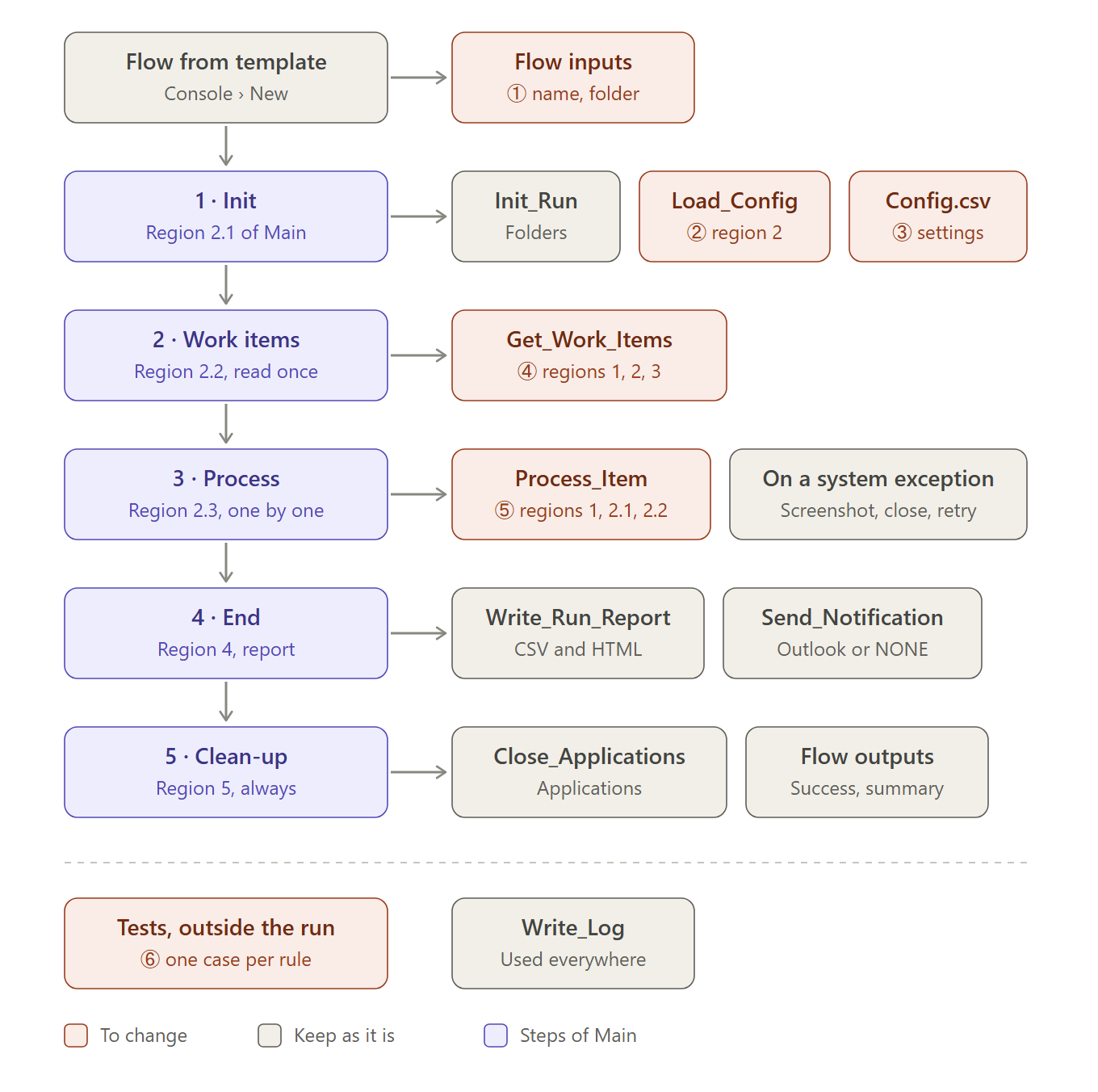
Where a process changes the template: the coral boxes, numbered as in the example below; the grey ones stay as they are
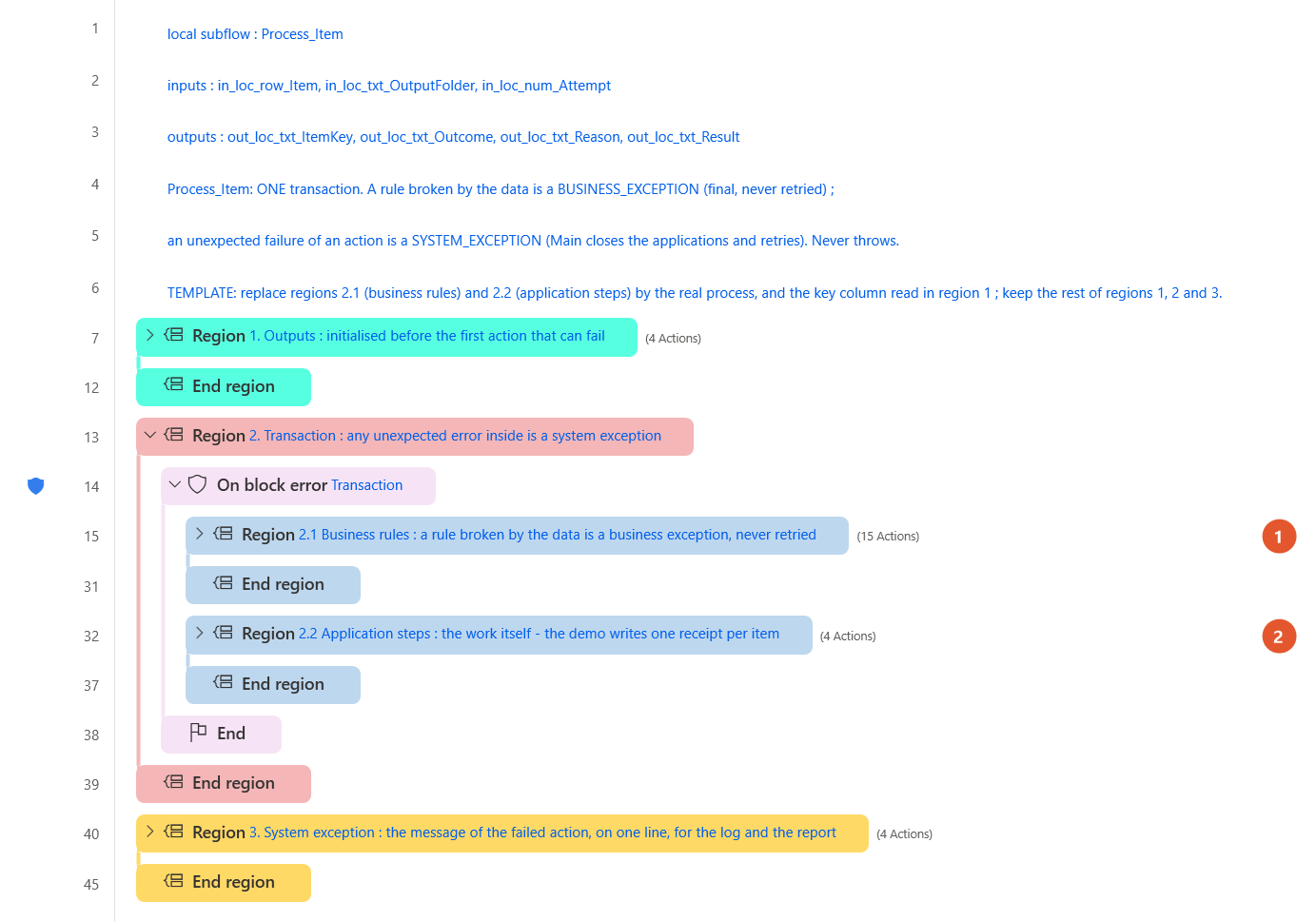
Process_Item: marker 1 on region 2.1 (business rules), marker 2 on region 2.2 (application steps)
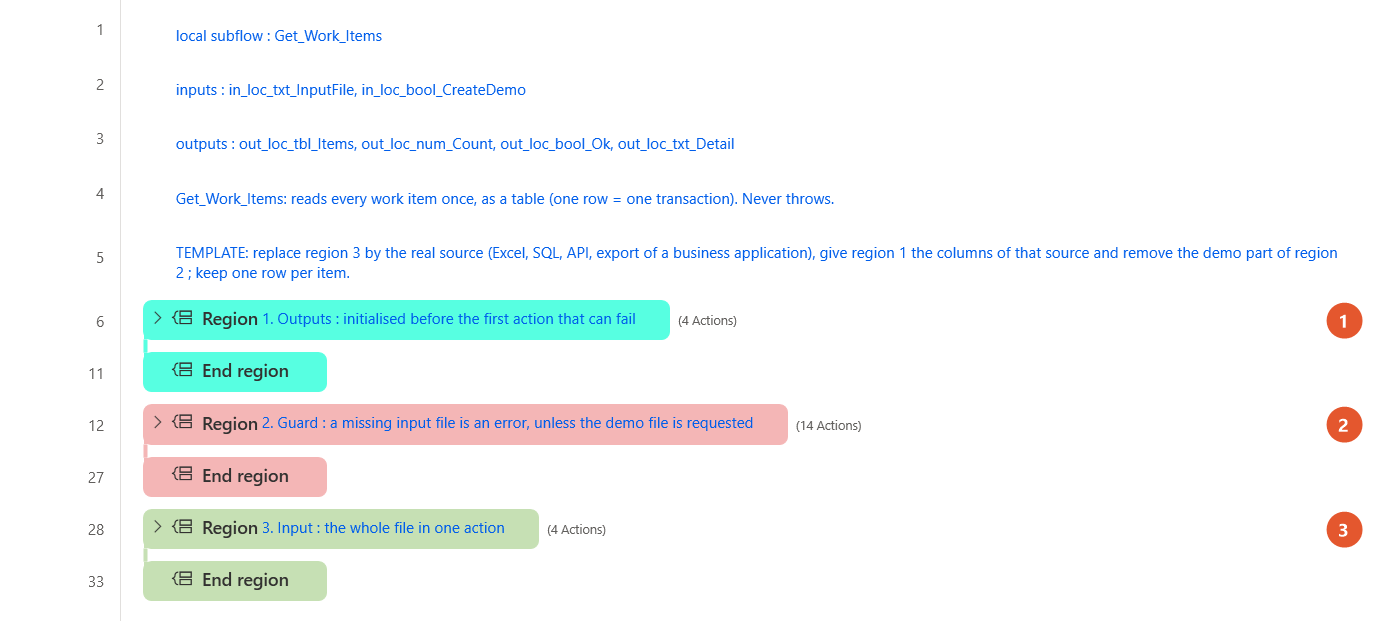
Get_Work_Items: markers on regions 1 (columns), 2 (demo part) and 3 (the source)
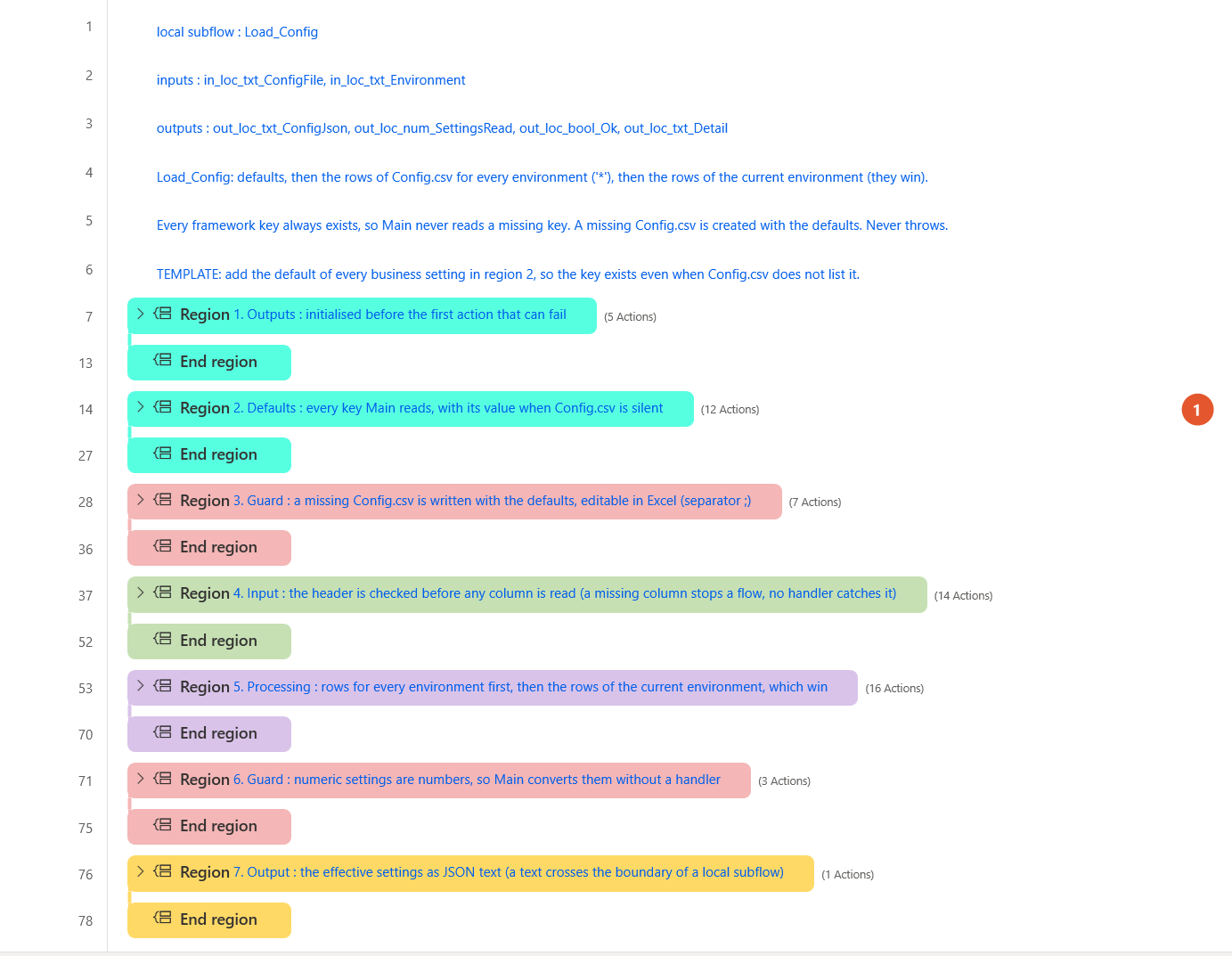
Load_Config: the marker shows region 2, the defaults of the settings
A complete example: Example: invoice reminders made from the template.
2.3 Test, then run
Tab Tests: right-click its first action, Run from here. Add one case for each rule you wrote; every line must say PASS. Then tab Main, Run, and read the log and the run report.
Troubleshooting
| Symptom | Fix |
|---|---|
| Run from here is greyed out in Tests | Right-click the first action of the subflow, at the very top of the canvas: the menu item is greyed out on an action inside a region. |
| Errors pane: Missing argument(s) on a Run subflow action, after an input was added to a function | Every CALL gives every input of the function: add the new input to the CALL in Main (region 2.3.1 for Process_Item) and in Tests. |
| In a flow made from the template, only the tab Main is open | The other subflows are there: open the Subflows list above the canvas and double-click one to open its tab. |
| The run is FATAL with 'Input file not found' | Put the file named by InputFile in the folder Input, or set CreateDemoInput to True in Config.csv for the demo. |
Other cases: Troubleshooting a paste · report a problem.