All samples › Excel
Excel range to an email-ready HTML table
Turn any Excel range into an HTML table that keeps its look (fills, fonts, borders, number formats), ready for an Outlook email.
Reusable component · Intermediate · Requires Microsoft Excel (desktop) · Tested on PAD 2.72.183 · v1.1.1
Step-by-step setup · Download the sample (zip) · Changelog
For e-learning purposes only: try it in a test environment with the sample data, and review it before any real use. Disclaimer
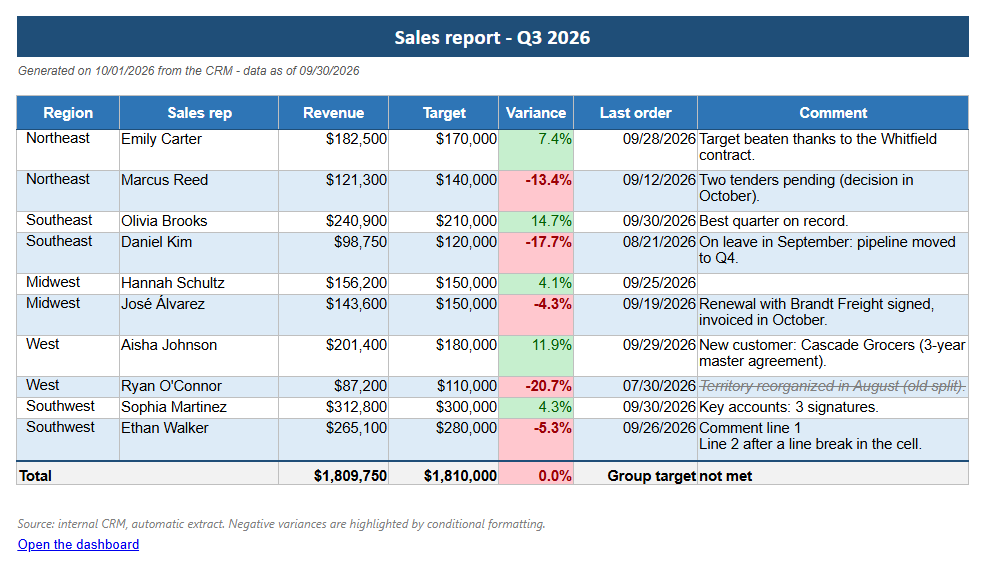
The HTML table returned by the function, same look
Try it
From the path that asks the least to the one that asks the most. Stop at the one you need.
| Path | You create | Needs | Time |
|---|---|---|---|
| 1. Quick try The whole conversion in one block pasted into Main. No subflow, no input or output to create. |
Nothing | Microsoft Excel (desktop) | 2 min |
| 2. Reusable version The function and its example call, in a flow of their own. |
1 local subflow, 3 inputs, 8 outputs | Microsoft Excel (desktop) | 15 min |
| 3. In your own flow Call Convert_Excel_To_Html from the flow you are building. |
The subflow, its 11 variables and one CALL line | Your flow | Depends on your flow |
Problem
A report must reach its readers as it looks in Excel: fills, conditional colours, borders, number formats.
PAD has no action that reads the formatting of a cell (Read from Excel worksheet returns values only), and a range
pasted by hand into an email keeps its styles in a <style> block that Outlook on the web and on mobile drop.
Solution
One Run PowerShell script action asks Excel itself. Excel, hidden and read-only, publishes the range as HTML with
its own engine; the script moves every CSS class inline on its cell, removes hidden rows and columns and the mso-*
rules, and writes every non-ASCII character as an entity. The action is wrapped in a local function
(3 inputs, 8 outputs) that never stops the flow: it returns a flag and a message.
Kept: Fills, fonts (name, size, colour, bold, italic, underline, strikethrough, rich text in a cell), alignment, wrap, indent, borders, merged cells, column widths, row heights, number formats as displayed, conditional formatting, hyperlinks.
Techniques: Local function with a contract · Errors returned, never thrown · One PowerShell action for what PAD cannot do · Excel driven through COM · Email-safe HTML · Outlook draft instead of a send
Use it in your flow
- Create the local subflow
Convert_Excel_To_Htmland its 3 inputs and 8 outputs (how). - Paste
flow/2-Convert_Excel_To_Html.txtinto it (44 lines). - Call it. The example in
Main:
CALL Convert_Excel_To_Html in_loc_txt_WorkbookPath: txt_WorkbookPath in_loc_txt_SheetName: txt_SheetName in_loc_txt_RangeAddress: txt_RangeAddress out_loc_txt_Html=> txt_Html out_loc_bool_Ok=> bool_Ok out_loc_txt_Error=> txt_Error out_loc_txt_SheetName=> txt_UsedSheetName out_loc_txt_RangeAddress=> txt_UsedRangeAddress out_loc_num_RowCount=> num_RowCount out_loc_num_ColumnCount=> num_ColumnCount out_loc_num_ElapsedMs=> num_ElapsedMs
| Inputs | Type | Description | Example |
|---|---|---|---|
in_loc_txt_WorkbookPath |
Text | Full path of the workbook | C:\Reports\Sales\Sales_Report_2026-Q3.xlsx |
in_loc_txt_SheetName |
Text | Sheet to read; empty = the sheet active when the workbook was saved | Q3 Sales |
in_loc_txt_RangeAddress |
Text | Range to read; empty = the used range | A1:H19 |
| Outputs | Type | Description | Example |
|---|---|---|---|
out_loc_txt_Html |
Text | The HTML table with inline styles | <table style="border-collapse:collapse;... |
out_loc_bool_Ok |
Boolean | True when the conversion worked | True |
out_loc_txt_Error |
Text | Why it failed; empty when out_loc_bool_Ok is True | Workbook not found: C:\Reports\Sales\Q3.xlsx |
out_loc_txt_SheetName |
Text | The sheet really read | Q3 Sales |
out_loc_txt_RangeAddress |
Text | The range really read | A1:H19 |
out_loc_num_RowCount |
Number | Visible rows in the table | 18 |
out_loc_num_ColumnCount |
Number | Visible columns in the table | 7 |
out_loc_num_ElapsedMs |
Number | Time taken by the conversion | 8550 |
Tip
Convert_Excel_To_Html never stops the flow. Test out_loc_bool_Ok after the call and read out_loc_txt_Error when it is False.
How it works
flowchart TB
  subgraph Main["<b>Main</b> · main"]
    direction LR
    Main_1["1. Variables"]
    style Main_1 fill:#57FFE1,stroke:#57606a,color:#1f2328
    Main_2["2. Call the function"]
    style Main_2 fill:#D9C3E9,stroke:#57606a,color:#1f2328
    Main_1 --> Main_2
    Main_3["3. Guards"]
    style Main_3 fill:#F4B6B6,stroke:#57606a,color:#1f2328
    Main_2 --> Main_3
    Main_4["4. Output"]
    style Main_4 fill:#FFD966,stroke:#57606a,color:#1f2328
    Main_3 --> Main_4
  end
  subgraph Convert_Excel_To_Html["<b>Convert_Excel_To_Html</b> · local function"]
    direction LR
    Convert_Excel_To_Html_1["1. Outputs initialised"]
    style Convert_Excel_To_Html_1 fill:#57FFE1,stroke:#57606a,color:#1f2328
    Convert_Excel_To_Html_2["2. Precondition"]
    style Convert_Excel_To_Html_2 fill:#F4B6B6,stroke:#57606a,color:#1f2328
    Convert_Excel_To_Html_1 --> Convert_Excel_To_Html_2
    Convert_Excel_To_Html_3["3. Convert"]
    style Convert_Excel_To_Html_3 fill:#D9C3E9,stroke:#57606a,color:#1f2328
    Convert_Excel_To_Html_2 --> Convert_Excel_To_Html_3
    Convert_Excel_To_Html_4["4. Outputs"]
    style Convert_Excel_To_Html_4 fill:#FFD966,stroke:#57606a,color:#1f2328
    Convert_Excel_To_Html_3 --> Convert_Excel_To_Html_4
  end
Main == "CALL · 3 in · 8 out" ==> Convert_Excel_To_HtmlConvert_Excel_To_Html, region by region:
- Outputs initialised: every path leaves them defined
- Precondition: a missing workbook is reported, never thrown
- Convert: Excel publishes the range, the script inlines the CSS; the first line of the output carries the details
- Outputs: the details line (tab-separated: name, sheet, range, rows, columns, milliseconds), then the HTML table
Design choices
Measured 2026-09-08, on the sample workbook (126 visible cells).
| Approach | Time | Result | Verdict |
|---|---|---|---|
| Native: Read from Excel worksheet + an HTML template | 0.06 s | Values only. No colour, font or border. | Use it when you impose your own style, not to keep the workbook's. |
| Excel publishes the range (PublishObjects) and nothing else | 0.26 s | All formatting, but as CSS classes in a <style> block; hidden cells emitted; windows-1252. |
Excellent raw material. Needs the rewrite below. |
| Clipboard HTML after Range.Copy (what a manual paste uses) | 0.67 s | The same class-based HTML. | Rejected: it overwrites the user's clipboard. |
| Cell by cell through COM (DisplayFormat) | 18 to 29 s | Faithful, inline CSS. | Rejected: about 70 ms per cell, over two minutes for 2,000 cells. |
| A picture of the range | 1.9 s | Pixel-exact PNG. | Rejected for a table: no search, no copy, images often blocked. |
| Chosen: Excel publishes, the script inlines the CSS | about 10 s | All formatting, inline CSS, hidden cells removed, entities. | The time does not depend on the size of the range. |
Performance
- About 10 s per call whatever the size of the range: Excel start 3.6 s, workbook open 1.6 s, publish 1.6 s, read 0.2 s, rewrite 1.3 s, close 0.3 s (profile of 2026-09-08).
- Tested run of 2026-09-26: 18 rows x 7 columns converted in 8.55 s, HTML table of 37,397 characters.
Limits
- Needs the desktop Excel on the PC (COM). The Outlook option of the quick try needs the classic Outlook with a profile; the new Outlook has no COM and no PAD action.
- Not kept: images, charts, shapes, icon sets, data bars, comments (no HTML equivalent in an email).
- The workbook path must not contain an apostrophe (it is interpolated in a PowerShell string).
- Script actions can be blocked by a data loss prevention (DLP) policy of the tenant.
- Checked in Outlook desktop and in a browser. Outlook on the web, mobile and Gmail were not tested; the output is plain inline-styled table HTML, the most portable form.
- A wide range gives a wide email: Excel's column widths are kept (952 px for the sample).
Files
| Subflow | Scope | Lines | Role |
|---|---|---|---|
Main |
Main | 34 | Example call: sets the workbook, sheet, range and output folder, calls the function, writes the HTML file. |
Convert_Excel_To_Html |
Local | 44 | The reusable part: 3 values in, the HTML table and 7 details out. Never stops the flow. |
Test |
Global | 77 | The quick try: the whole conversion in one block, the table opened in the browser (or an Outlook draft). (optional) |
- Sample files, in
input/:Sales_Report_2026-Q3.xlsx - Output of the test run, in
expected/:Sales_Report_2026-Q3_table.html
Tested on
| PAD version | Date | Path | Result |
|---|---|---|---|
| 2.72.183 | 2026-09-26 | Full flow | Pass |
| 2.72.183 | 2026-09-29 | Quick try | Pass |
Authors: Anne (AI agent), HyperAutomatisation · Changelog · Report a problem