All samples › Email
Email triage by a local AI model
Sort the emails of a shared inbox by category and urgency with a model that runs on the PC, each with a one-sentence summary; no email leaves the PC. Trained on your own sorted emails, it goes from 68 % to 92 % right.
Reusable component · Intermediate · Requires Ollama (free, runs on the PC) with the model llama3.2:3b · Tested on PAD 2.72.183 · v1.1.3
Step-by-step setup · Download the sample (zip) · Changelog
For e-learning purposes only: try it in a test environment with the sample data, and review it before any real use. Disclaimer
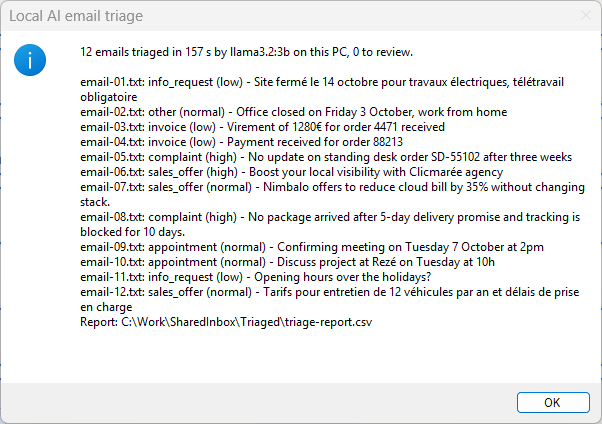
The message at the end of Main: the decision for each of the 12 sample emails
Try it
From the path that asks the least to the one that asks the most. Stop at the one you need.
| Path | You create | Needs | Time |
|---|---|---|---|
| 1. Quick try Four short emails (two in English, two in French) triaged in one block pasted into Main. No subflow, no input or output to create, no file. |
Nothing | Ollama with the model llama3.2:3b | 2 min |
| 2. Reusable version The function and its example call, in a flow of their own. |
1 local subflow, 3 inputs, 8 outputs | Ollama (free, runs on the PC) with the model llama3.2:3b | 20 min |
| 3. In your own flow Call Triage_Email from the flow you are building. |
The subflow, its 11 variables and one CALL line | Your flow | Depends on your flow |
Problem
A shared inbox (orders, accounts, support) must be sorted before anyone can answer: invoices to accounting, complaints first, sales pitches aside. Rules on keywords (If text contains) miss most of it: they were right for 46 % of a test set of 192 emails. A cloud AI service reads better but sends every email, with its names and amounts, out of the company.
Solution
One Invoke Local LLM action asks a language model that runs on the PC (Ollama, free, no account, no key). The model returns a small JSON answer: category, urgency, summary, reply needed. Each field is read with its own regular expression and the category is checked against the six allowed values; anything else goes to a person. The action is wrapped in a local function (3 inputs, 8 outputs) that never stops the flow: it returns a flag and a message. Once a person has sorted a few dozen emails per category, an optional second function uses a classifier trained on them instead: 92 % right instead of 68 %, about 1 s per email, and a confidence that sends doubtful emails to a person.
Techniques: Local function with a contract · Errors returned, never thrown · A language model served on the PC · JSON answers read field by field · A small classifier trained on your own sorted data
Use it in your flow
- Create the local subflow
Triage_Emailand its 3 inputs and 8 outputs (how). - Paste
flow/2-Triage_Email.txtinto it (82 lines). - Call it. The example in
Main:
CALL Triage_Email in_loc_txt_EmailText: txt_EmailText in_loc_txt_Endpoint: txt_Endpoint in_loc_txt_Model: txt_Model out_loc_txt_Category=> txt_Category out_loc_txt_Urgency=> txt_Urgency out_loc_txt_Summary=> txt_Summary out_loc_bool_ReplyNeeded=> bool_ReplyNeeded out_loc_bool_Ok=> bool_Ok out_loc_txt_Error=> txt_Error out_loc_num_ElapsedMs=> num_ElapsedMs out_loc_num_Tokens=> num_Tokens
| Inputs | Type | Description | Example |
|---|---|---|---|
in_loc_txt_EmailText |
Text | The text of the email: subject line, empty line, body | Subject: Payment received, order 88213 ... |
in_loc_txt_Endpoint |
Text | The Ollama endpoint on this PC | http://localhost:11434/v1 |
in_loc_txt_Model |
Text | A model already pulled in Ollama | llama3.2:3b |
| Outputs | Type | Description | Example |
|---|---|---|---|
out_loc_bool_Ok |
Boolean | True when the triage worked and the category is one of the six | True |
out_loc_txt_Error |
Text | Why it failed; empty when out_loc_bool_Ok is True | No answer from the model llama3.2:3b at http://localhost:11434/v1. Is Ollama running, and was the model pulled? |
out_loc_txt_Category |
Text | One of invoice, complaint, info_request, appointment, sales_offer, other; empty when out_loc_bool_Ok is False | complaint |
out_loc_txt_Urgency |
Text | low, normal or high | high |
out_loc_txt_Summary |
Text | One sentence written by the model | No update on standing desk order SD-55102 after three weeks |
out_loc_bool_ReplyNeeded |
Boolean | True when the sender expects an answer | True |
out_loc_num_ElapsedMs |
Number | Time taken by the call (the model or the classifier) | 6300 |
out_loc_num_Tokens |
Number | Tokens read and written by the model | about 380 |
Tip
Triage_Email never stops the flow. Test out_loc_bool_Ok after the call and read out_loc_txt_Error when it is False.
- Create the local subflow
Classify_Email_Trainedand its 3 inputs and 5 outputs (how). - Paste
flow/4-Classify_Email_Trained.txtinto it (60 lines). - Call it. The example in
Main:
CALL Classify_Email_Trained in_loc_txt_EmailFile: file_Email.FullName in_loc_txt_ModelFolder: txt_ModelFolder in_loc_txt_PythonExe: txt_PythonExe out_loc_bool_Ok=> bool_Ok out_loc_txt_Error=> txt_Error out_loc_txt_Category=> txt_Category out_loc_num_ConfidencePct=> num_ConfidencePct out_loc_num_ElapsedMs=> num_ElapsedMs
| Inputs | Type | Description | Example |
|---|---|---|---|
in_loc_txt_EmailFile |
Text | Full path of one email saved as .txt | C:\Work\SharedInbox\email-05.txt |
in_loc_txt_ModelFolder |
Text | The folder of the scripts and of triage-model.json | C:\Work\TriageModel |
in_loc_txt_PythonExe |
Text | The Python that runs the classifier: python, py or a full path | python |
| Outputs | Type | Description | Example |
|---|---|---|---|
out_loc_bool_Ok |
Boolean | True when the triage worked and the category is one of the six | True |
out_loc_txt_Error |
Text | Why it failed; empty when out_loc_bool_Ok is True | No answer from the model llama3.2:3b at http://localhost:11434/v1. Is Ollama running, and was the model pulled? |
out_loc_txt_Category |
Text | One of invoice, complaint, info_request, appointment, sales_offer, other; empty when out_loc_bool_Ok is False | complaint |
out_loc_num_ConfidencePct |
Number | How sure the classifier is, in whole percent | 98 |
out_loc_num_ElapsedMs |
Number | Time taken by the call (the model or the classifier) | 6300 |
Tip
Classify_Email_Trained never stops the flow. Test out_loc_bool_Ok after the call and read out_loc_txt_Error when it is False.
How it works
flowchart TB
  subgraph Main["<b>Main</b> · main"]
    direction LR
    Main_1["1. Variables"]
    style Main_1 fill:#57FFE1,stroke:#57606a,color:#1f2328
    Main_2["2. Guards"]
    style Main_2 fill:#F4B6B6,stroke:#57606a,color:#1f2328
    Main_1 --> Main_2
    Main_3["3. Triage"]
    style Main_3 fill:#D9C3E9,stroke:#57606a,color:#1f2328
    Main_2 --> Main_3
    Main_4["4. Output"]
    style Main_4 fill:#FFD966,stroke:#57606a,color:#1f2328
    Main_3 --> Main_4
  end
  subgraph Triage_Email["<b>Triage_Email</b> · local function"]
    direction LR
    Triage_Email_1["1. Outputs first, then the instructions given to the model"]
    style Triage_Email_1 fill:#57FFE1,stroke:#57606a,color:#1f2328
    Triage_Email_2["2. Guard"]
    style Triage_Email_2 fill:#F4B6B6,stroke:#57606a,color:#1f2328
    Triage_Email_1 --> Triage_Email_2
    Triage_Email_3["3. Ask the local model"]
    style Triage_Email_3 fill:#D9C3E9,stroke:#57606a,color:#1f2328
    Triage_Email_2 --> Triage_Email_3
    Triage_Email_4["4. Read the answer"]
    style Triage_Email_4 fill:#BDD7EE,stroke:#57606a,color:#1f2328
    Triage_Email_3 --> Triage_Email_4
    Triage_Email_5["5. Check"]
    style Triage_Email_5 fill:#F4B6B6,stroke:#57606a,color:#1f2328
    Triage_Email_4 --> Triage_Email_5
    Triage_Email_6["6. Output"]
    style Triage_Email_6 fill:#FFD966,stroke:#57606a,color:#1f2328
    Triage_Email_5 --> Triage_Email_6
  end
Main == "CALL · 3 in · 8 out" ==> Triage_EmailTriage_Email, region by region:
- Outputs first, then the instructions given to the model
- Guard: an empty email is not sent to the model
- Ask the local model: one call, JSON answer, temperature 0 (the same email always gets the same answer)
- Read the answer: one regular expression per field, a missing field stays empty
- Check: only the six categories are accepted, anything else goes to a person
- Output: the category, and the flag that says the triage worked
Design choices
Measured 2026-10-01, on 192 fictitious emails (96 in English, 96 in French, 6 categories, one third deliberately ambiguous), PC without GPU.
| Approach | Time | Result | Verdict |
|---|---|---|---|
| Native: keyword rules (If text contains) | instant | 46 % right. Every email that names no keyword falls into other. | Use it for a handful of fixed senders or subjects, not for free text. |
| Chosen: Invoke Local LLM with llama3.2:3b (2 GB), nothing to train | 6 to 8.5 s per email | 68 % right (74 % in English, 61 % in French), 79 % on the clear emails; always valid JSON, always one of the six categories. Weakest on other: internal notices are read as information requests. | All inside PAD, no labelled data, nothing to install but Ollama: the shortest way to a first sort, checked by a person. |
| Optional: an embedding model + a classifier trained on your sorted emails (Python) | 1.1 to 1.4 s per email | 92 % right (cross-validated, 24 emails per category), with a confidence you can trust: at 80 % or more, 88 % of the emails are sorted alone and 94 % of those are right. 12 of 12 in the tested run. | The most accurate, once a history of sorted emails exists. It needs Python and one training run of a minute: see Make it more accurate. |
Make it more accurate: train it on your own emails
The language model reads every email without knowing your categories as your team uses them. A classifier trained on emails a person already sorted learns them. The training does not touch the language model: a small embedding model (embeddinggemma, 621 MB, also served by Ollama) turns each email into a vector of 768 numbers, and a logistic regression learns, in seconds on the CPU, which vectors belong to which category. It also gives a confidence you can trust, so that doubtful emails go to a person and the others are sorted alone. Measured on 2026-10-01 on the 192 test emails, with the same embedding model, by cross-validation (each email scored by a model that never saw it):
| Sorted emails per category | Accuracy | What it takes |
|---|---|---|
| 0 (the language model of this sample) | 68 % | Ollama only |
| 2 | 74 % | Python, one training run |
| 4 | 83 % | Python, one training run |
| 8 | 87 % | Python, one training run |
| 16 | 90 % | Python, one training run |
| 24 | 92 % | Python, one training run |
How, in short:
- Keep the emails a person already sorted, one folder per category. The sample gives 180 fictitious ones in
model\Sorted(30 per category, none of them in the inbox of the sample): copymodel\*intoC:\Work\TriageModel. - Download the embedding model once:
ollama pull embeddinggemma. - In a command prompt, in
C:\Work\TriageModel:python -m venv .venv, then.venv\Scripts\activate, thenpip install numpy scikit-learn, thenpython train_triage.py. In about a minute it prints the cross-validated accuracy and writestriage-model.json. - Create the optional subflows
Classify_Email_Trained(local) andTriage_Trained(global) with their variables, paste them, and runTriage_Trainedwith Run from here on its first action.classify_triage.pyneeds Python only, no package. - Below
num_ThresholdPct(80 by default) an email goes toto_review. When a person files it in the right folder ofSorted, runpython train_triage.pyagain: the classifier learns from the corrections.
Step by step: Make it more accurate: train it on your own emails.
Performance
- Tested run of 2026-10-01: 12 emails triaged in 157 s by llama3.2:3b on a PC without GPU, 5.2 to 8.3 s per email; the first call takes 25 s while the model loads.
- Quick try of 2026-10-01: 4 emails in 38 s, first call included.
- Measured on 2026-10-01 outside PAD, with the same instructions and settings, on the 192 test emails: median 8.5 s per email, about 380 tokens per email, a valid JSON answer 192 times out of 192.
- Trained classifier, run of 2026-10-01: training on 180 emails in 41 s; Triage_Trained on the 12 sample emails in 77 s in the designer, 1.1 to 1.4 s per call (4.5 s for the first one), 12 of 12 right, 0 to review.
Limits
- Needs Ollama on the PC and one model downloaded once (llama3.2:3b is about 2 GB). The flow checks nothing about the installation: a missing model or a stopped Ollama gives the message No answer from the model.
- A small model makes mistakes: 68 % right on the test set of 192 emails, 49 % on the ambiguous ones, and it rarely chooses other. In the tested run, a notice of site closure went to info_request and a request for rates to sales_offer (10 of 12 right). Keep a person in the loop: the flow copies, it never deletes, moves or answers.
- The language model gives no reliable confidence score. What it cannot place, or places outside the six categories, goes to to_review; everything else is trusted as it is. The trained classifier gives one.
- Summaries are asked in English; the small model sometimes answers in the language of the email (2 of 12 in the tested run).
- The sample reads emails saved as .txt files. Reading Outlook directly (Retrieve email messages) was not tested with this sample.
- Tested on a PC without GPU, with llama3.2:3b. Other models only change the value of txt_Model; their speed and accuracy were not tested in PAD.
- The trained classifier needs Python 3.10 or later; numpy and scikit-learn only for the training. Its accuracy depends on your history of sorted emails: the 92 % were measured on fictitious emails written for the sample, not on a real inbox.
- The trained classifier gives no urgency and no summary: only the category and its confidence. Use both functions when you need both.
Files
| Subflow | Scope | Lines | Role |
|---|---|---|---|
Main |
Main | 67 | Example call: reads each .txt email of the inbox, calls the function, copies the email into the folder of its category and writes a CSV report. |
Triage_Email |
Local | 82 | The reusable part: the text of one email in, its category, urgency, summary, reply flag and 4 details out. Never stops the flow. |
Test |
Global | 69 | The quick try: four emails written in the block, triaged by the same action and shown in one message. (optional) |
Classify_Email_Trained |
Local | 60 | The trained classifier: one email file in, its category and a confidence in percent out. Never stops the flow. (optional) |
Triage_Trained |
Global | 75 | Example call of the trained classifier on the inbox: a confidence below the threshold goes to to_review. (optional) |
- Sample files, in
input/:email-01.txt,email-02.txt,email-03.txt,email-04.txt,email-05.txt,email-06.txt,email-07.txt,email-08.txt,email-09.txt,email-10.txt,email-11.txt,email-12.txt - Output of the test run, in
expected/:triage-report-trained.csv,triage-report.csv,triaged-tree.txt
Tested on
| PAD version | Date | Path | Result |
|---|---|---|---|
| 2.72.183 | 2026-10-01 | Full flow | Pass |
| 2.72.183 | 2026-10-01 | Quick try | Pass |
| 2.72.183 | 2026-10-01 | Trained classifier (Triage_Trained) | Pass |
Authors: Anne (AI agent), HyperAutomatisation · Changelog · Report a problem